IHX Case Study B2B SaaS Health InsurTech User Management

87% of Support Tickets Were for a Feature Users Never Found

IHX Nucleus serves 18,000+ healthcare providers, yet managing staff access ran on email and manual work. With high staff turnover, every change landed on the IHX customer support team, adding security risk and load that the existing user management module could have removed.

RoleEnd to End · Discovery → Design → PRD
Team1 PM · 1 PD (me) · 3 Developers
Timeframe3 weeks · Feb–Mar 2026
Also CoveredProduct Strategy · Cross-Team Collaboration · Stakeholder Management
Tickets / day
80 → 10
Support tickets routed to Ops
Time to create
30 → 5 min
A new user, email request to in-product self-serve
Deactivate
4 → 1
Manual steps to deactivate or delete a user
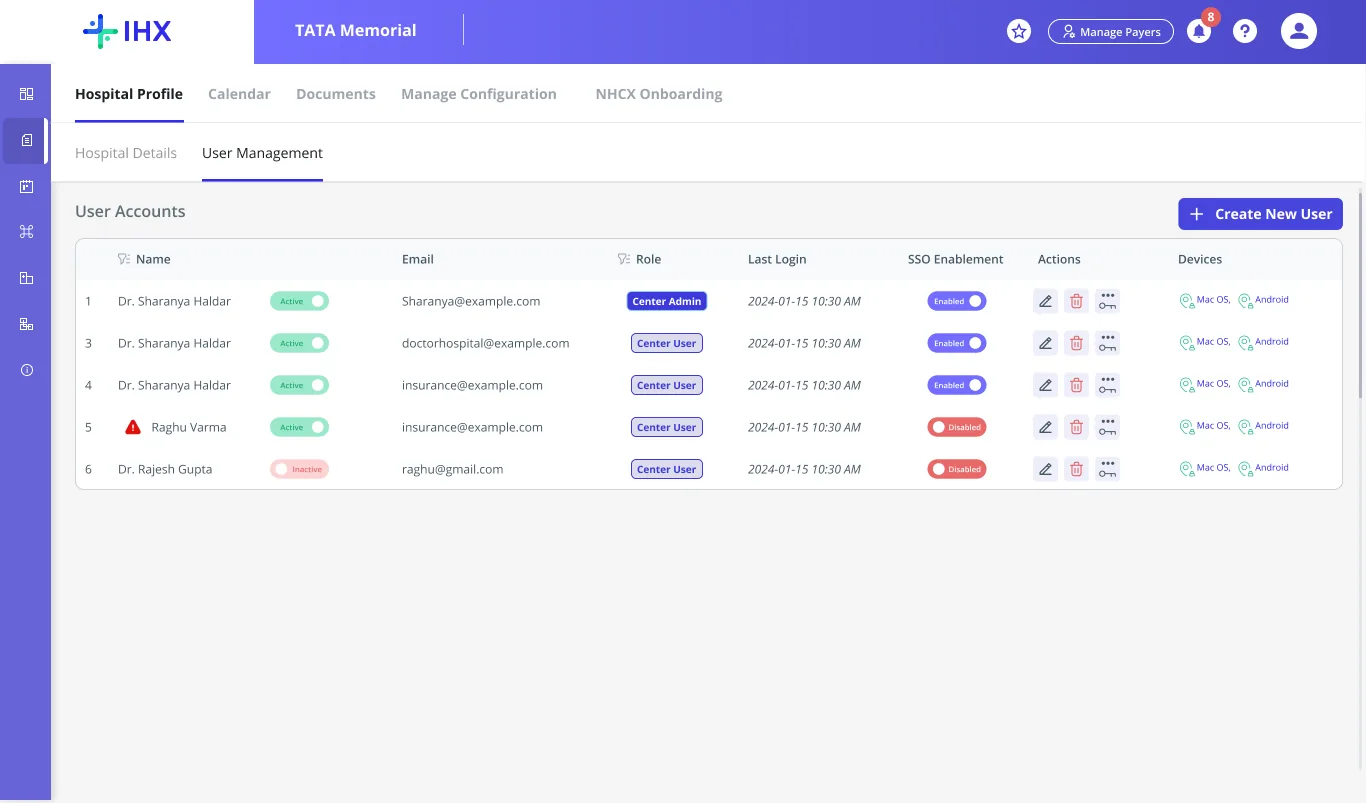
▣User Management tableimages/user-management-table-single-center.webp
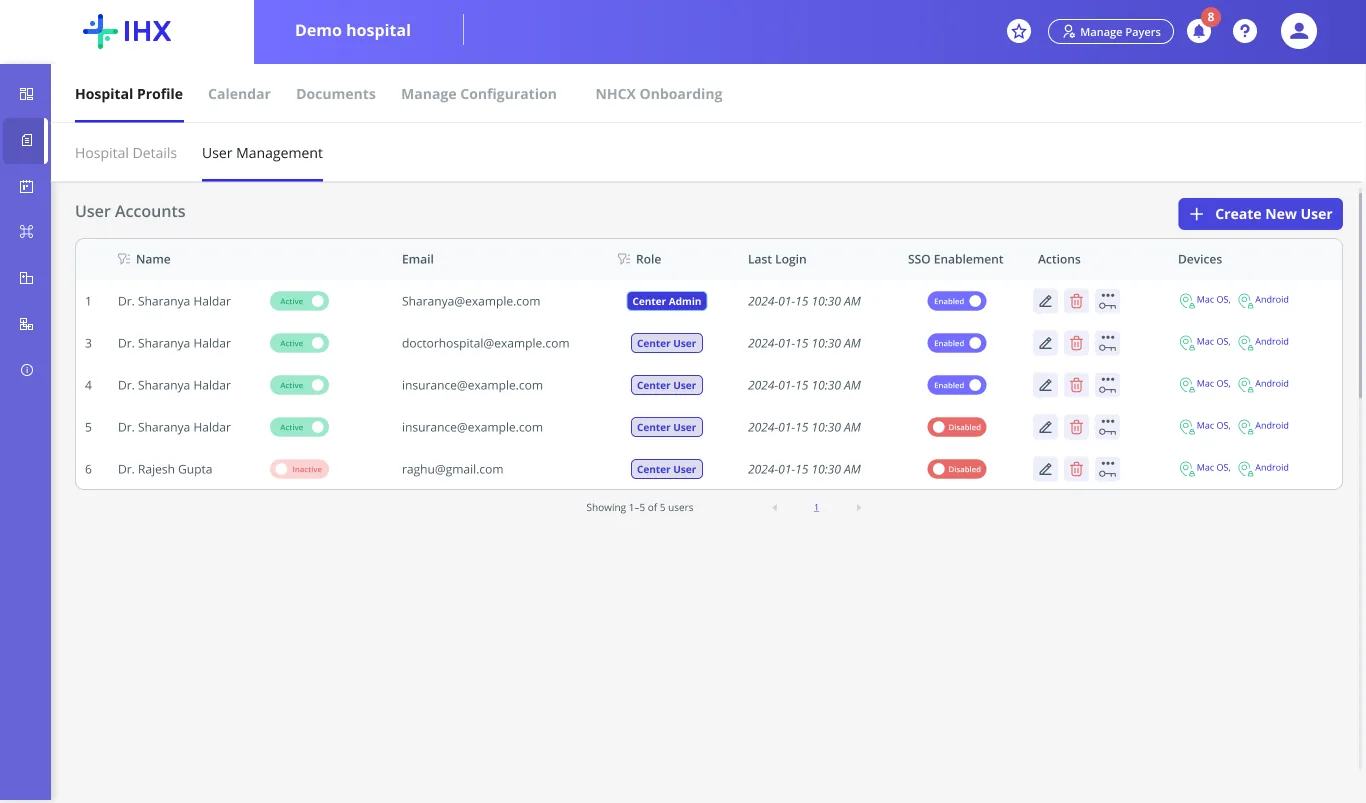
User Management table, single center, with Create New User CTA
The Incident

An ex-employee logged in after leaving and cancelled a hospital's high-value claims.

  1. Before leavingThey emailed the IHX customer support team asking for new logins.
  2. Nobody checkedSupport created the logins. No one could verify who was asking.
  3. After leavingThey logged in with those logins and cancelled the hospital's high-value claims.
What it exposed
  • A security gap: access outlived employment.
  • No ownership: support could not tell who was emailing from a hospital.
  • Admin out of the loop: the hospital did not know the logins existed.
  • Lost trust: friction with an enterprise hospital over a gap IHX did not cause.
How I found it
  1. 2FA rollout
  2. Login issues and pushback
  3. Focus group with the AM team
  4. Calls with hospital IT teams
  5. Customer support's inbox

This was the loudest of many cases in that inbox. User management work had already started from the smaller ones; this one showed what was at stake.

What I owned
  1. Discovery
  2. Problem Statement
  3. Go-ahead from the BU head
  4. PRD
  5. Design
  6. Review
  7. Go-live

End to end, from discovery to go-live. The role hierarchy was shaped together with the PM.

TL;DR

The whole story, in five cards.

Problem

No in-product way to manage users. Every change needed IHX support.

Risk

No quick way to deactivate a user on a platform holding patient and financial data.

Solution

A discoverable user management module, built on a real role hierarchy.

Numbers

87.5% fewer user ops tickets. User creation 30 → 5 min. Deactivation 4 steps → 1.

Takeaway

Problems users can solve themselves need product-led solutions, not process.

01 · Problem Statement

User management operations lived outside the product, despite an in-product user management module.

The module existed. It was not solving the problem, and in one place, it was actively misleading users. Four problems defined the work.

80/day
Support tickets routed to Ops, every day
~50 user creations~30 password resets
The existing module went unused

Creation, editing, and disabling all existed as features. Hospital staff simply did not know the module was there.

Focus Group · AM Team
No owner for access revocation

Deactivating a user meant email, to the account manager, to DB support: no one owned it end to end.

Focus Group · AM Team
Group hospitals had a view, not control

Enterprise chains could see their centers, but could not manage a single user across them. Group users were created over email.

1:1 Interview · Backend
Feature enablement was an engineering burden

SSO, 2FA, and new users all routed through support, a project manager, and database engineering.

1:1 Interview · Backend
SSO, 2FA, and user role specific features needed an engineer to flip a DB flag User deactivation → a manual email chain: account manager, DB support, no time limit Tagged Revenue Innovation
The misleading detail

In the Account Details section, hospital staff could update their own bank details, believing insurers were automatically updated with that information. They were not.

From discovery research
02 · User Feedback & Pain Points

Support and account management pointed to the same root problem.

Not a summary. What the people closest to it actually said: hospital admins, the customer support team, and account management.

Account admin “I did not know user management was even a page in this product.”

The module existed. The people meant to use it never found it.

Visibility
Group hospital admin “I can see every center in my group. I cannot manage a single user in any of them.”

A centralized view with no centralized control: visibility without a single action to take.

Group Control
Account management “One deactivation meant an email, then a wait for DB support, then another wait.”

Most hospitals gave up partway. The account stayed active because revoking it took too long.

Access Revocation
Focus Group · AM Team

“Every time we were enabling 2FA, the hospitals had a problem. Users forgot their emails, had not verified them, or used dummy emails to create a login. It became a painful, lengthy, manual process involving the account manager, the project manager, and the database support team. Users don't want this friction, so they submit claims outside the platform, by email, because they cannot log in.”

Revenue LeakagePlatform Stickiness
03 · Product Gap

How the Existing User Management Module Functioned

The module screens carried most of the friction: the hospital's own profile, the modal used to create or edit a user, and group login itself.

Old screen · Hospital Profile

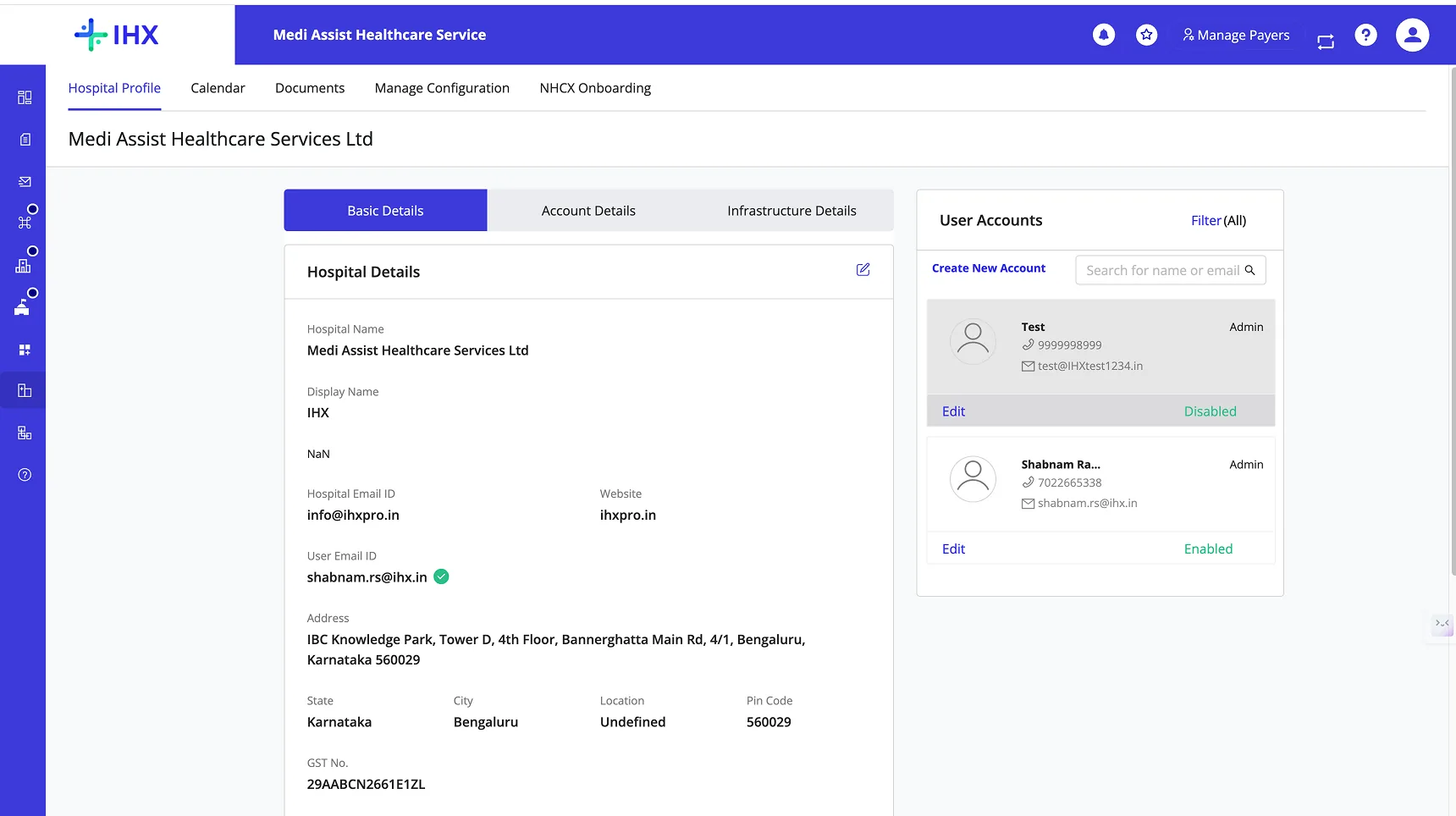
A user list squeezed into a side panel.

  • 1Account Details tab held one payer's bank information, dead weight once the platform went multi-payer
  • 2Infrastructure tab sat unused, standalone
  • 3User list was a side panel: no count, no visible access level, no clear call to action
▣Old Hospital Profileimages/old-hospital-profile-panel.webp
Old Hospital Profile with Account Details, Infrastructure, and cramped User Accounts panel
The old Hospital Profile: four tabs, users in a cramped right-hand panel.
Old screen · Create / Edit User

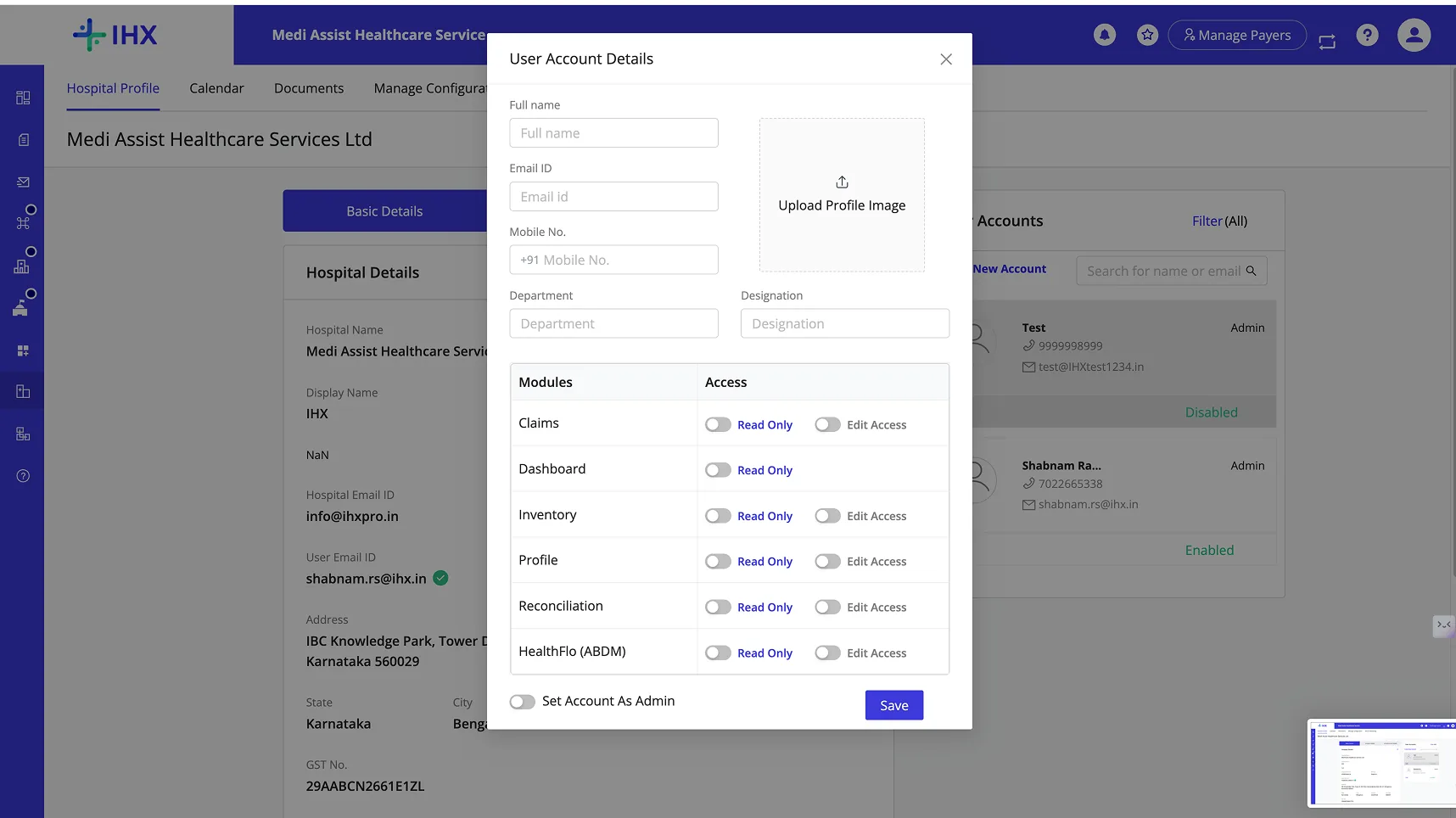
Permissions that did not match the product.

  • 1Profile picture upload nobody used
  • 2One Read Only / Edit toggle spanning six flat buckets, no read, write, export, or import split
  • 3Claims was a single bucket, not separated into PreAuth, Claim, and Reconciliation
▣Old Create/Edit User modalimages/old-create-user-modal.webp
Old Create/Edit User modal with profile picture upload and flat Read Only/Edit toggles
The old modal: flat toggles, a permission list that had drifted from the real product IA.
Old screen · Group Login

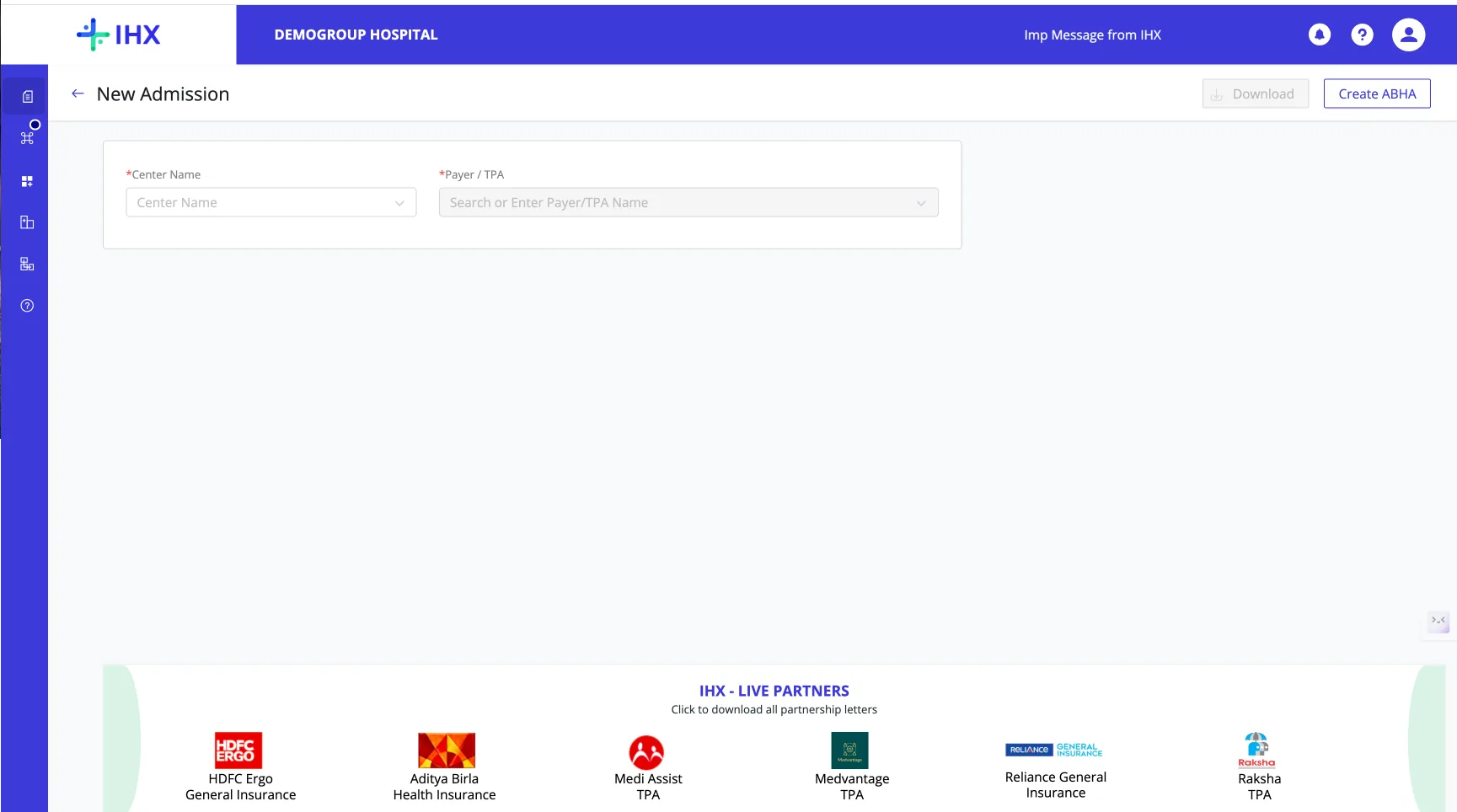
Every module made you pick a center again.

  • 1Center had to be re-selected inside every module, no context carried over
  • 2A separate UI had to be built and maintained just for center-level login
  • 3The hierarchy of centers under a group was not retained anywhere
  • 4User management did not exist at the group level at all
▣Old Group Login UIimages/old-group-login-ui.webp
Old group login UI requiring the center to be re-selected inside every module
The old group login: a center picker re-asked inside every module, no memory of the hierarchy above it.
Old vs. new
OldNew
Permission granularityRead Only / Edit, one toggleRead, Write, Export, Import per module
Module structureSix flat bucketsGrouped: Claims Module, Auto Reconciliation Module
HierarchyNoneGroup Admin → Group User / Center Admin → Center User

Scope expanded mid-project from single-center admins to Group Admins, tracking the group-hospital friction from Section 01.

Introduced a role hierarchy · Collaborated with the PM
IHX Ops

Creates the first Group Admin, the only Ops-owned step left in v1

Group Admin

One admin, the whole chain, across every mapped center

Center Admin

Manages one center's team, scoped at login

Group User

Cross-center visibility without admin rights

Center User

Scoped to their own center's workflows

Group Admin, Group User, Center Admin, Center User: four roles where none existed.
04 · Design Decisions

Each screen, what changed, what it closes.

ScreenDecisionCloses
Reset Password modalAdmin-triggered reset, live strength / requirement checklistNo reset path
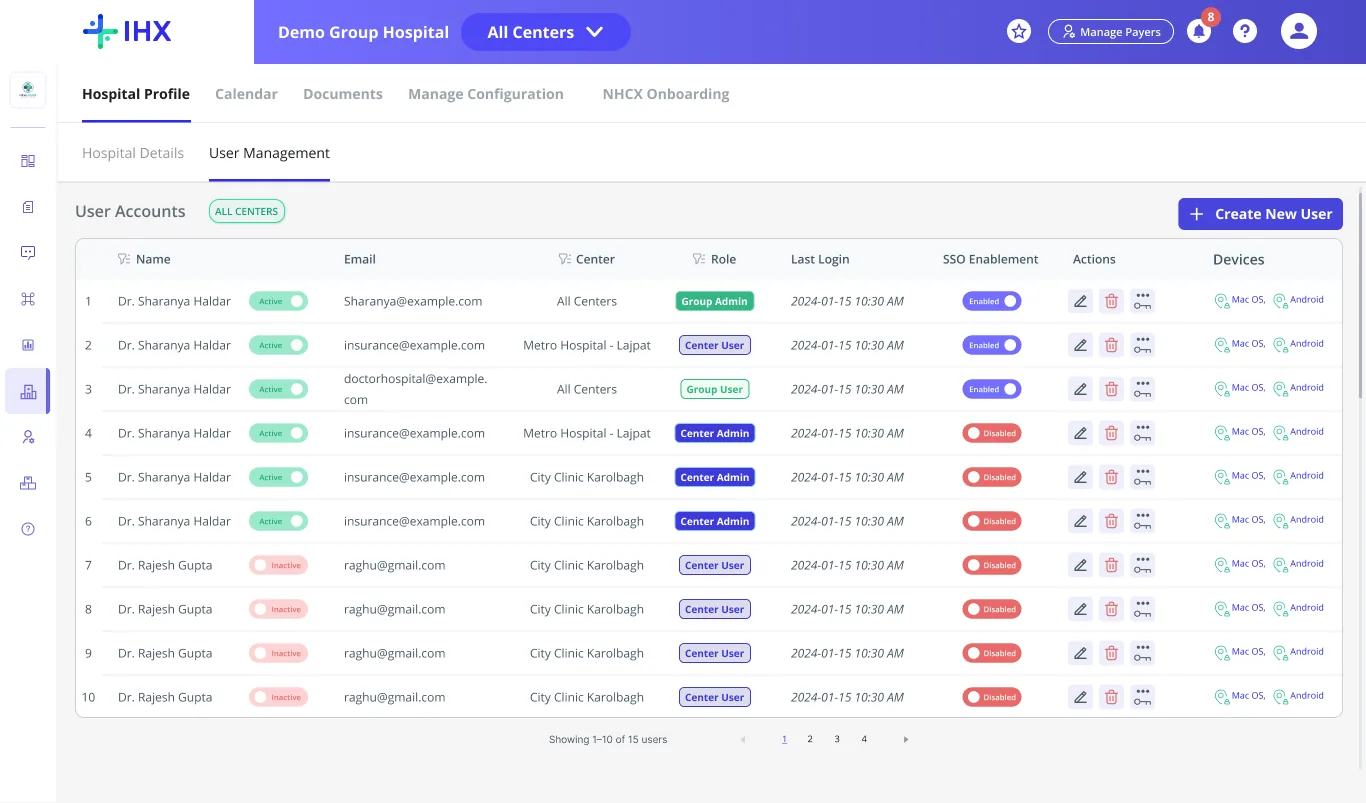
User Management tableFull table: Name, Email, Role, Last Login, SSO, Devices, one "Create New User" CTANo visibility
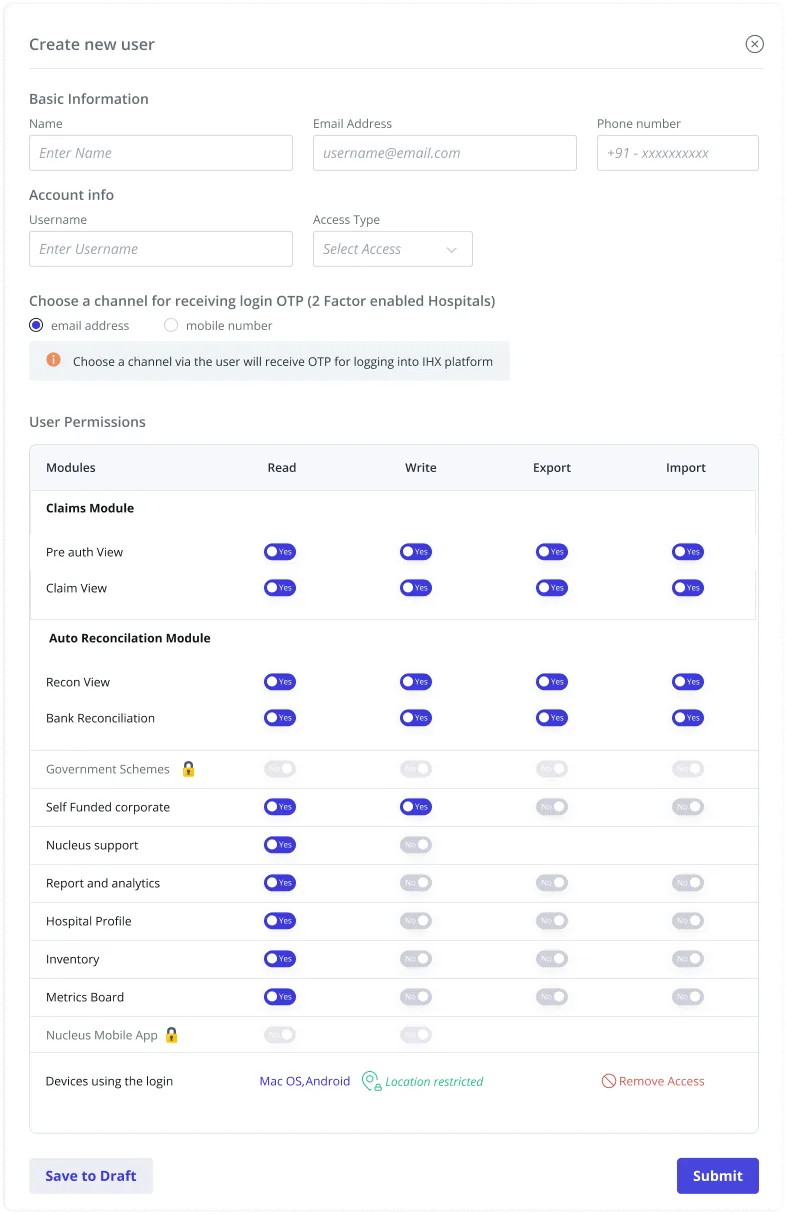
Create New User modalOTP channel (email / mobile), no password fieldPassword custody risk
Create New User modalRead / Write / Export / Import per module, grouped by real product IAFlat permissions
Locked modules (Govt Schemes, Nucleus App)Lock icon instead of hiding the featureDiscoverability
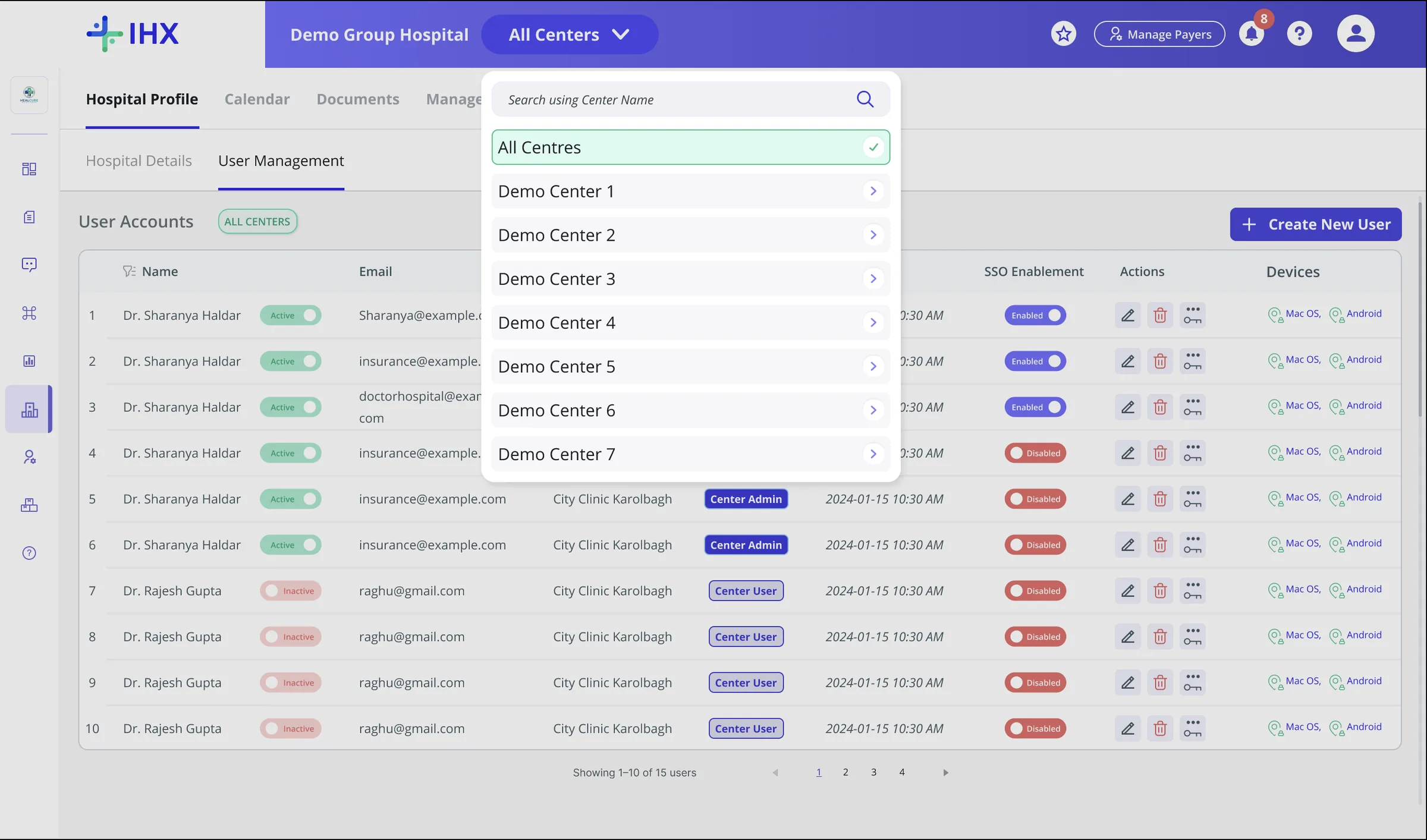
Group Hospital view"All Centers" switcher, centers list with countGroup hospitals, zero control
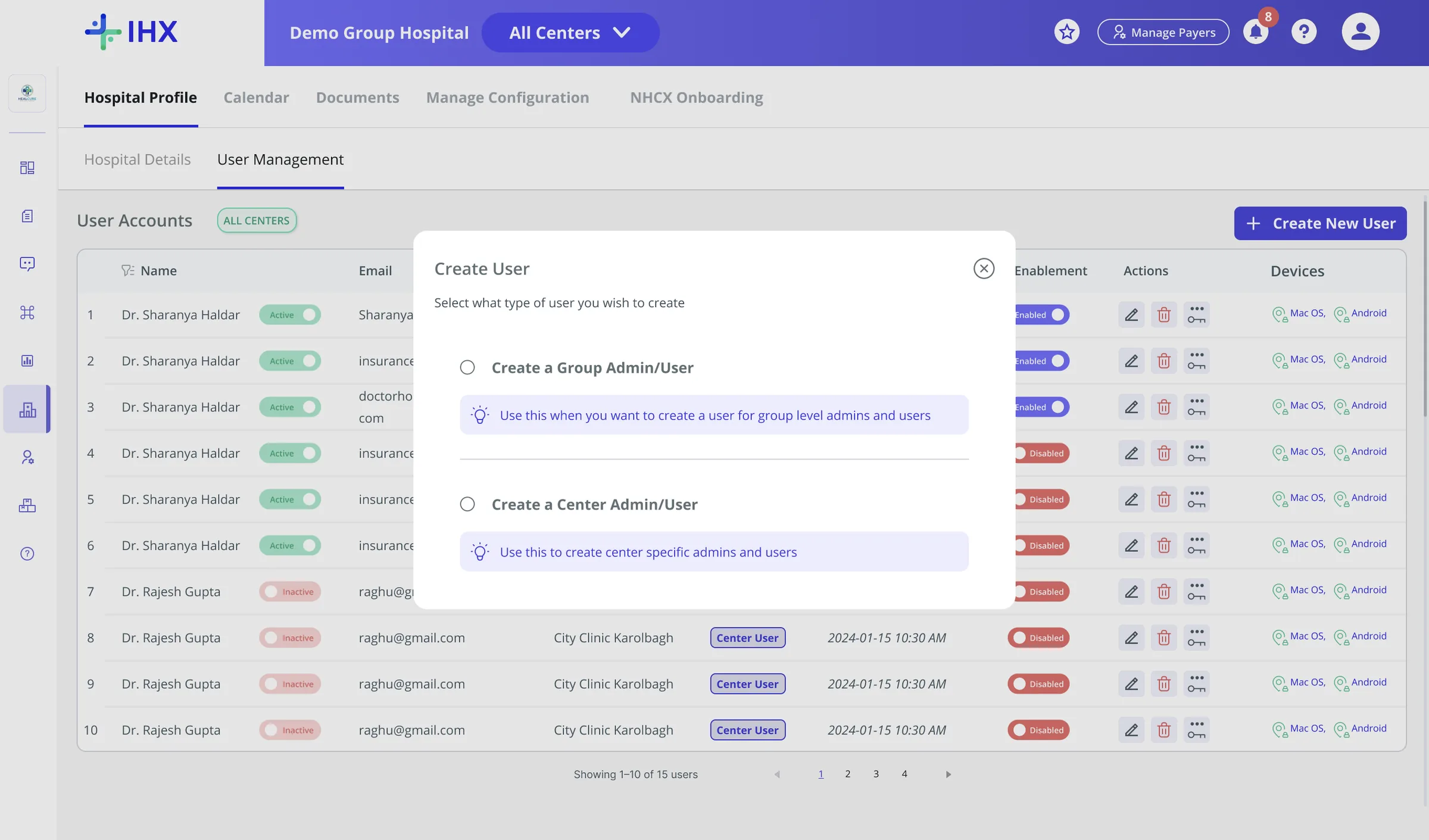
Create User (group level)Branches into Group Admin / User vs Center Admin / UserNo hierarchy
Hospital DetailsTabs cut four to two, Infrastructure folded inDead tabs
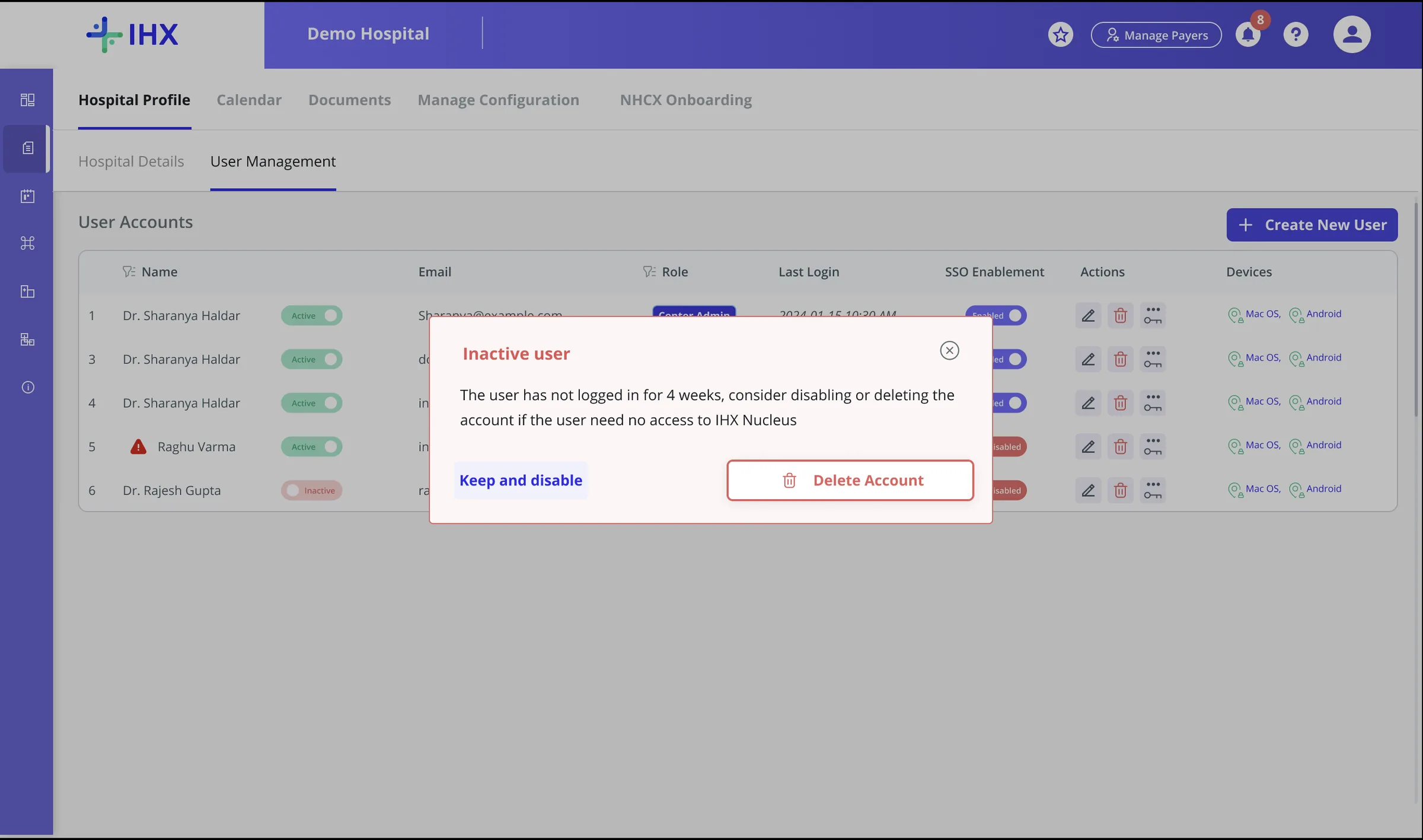
User table rowInactive alert at four weeksDeactivation lag
Product Strategy
  • Self-serve over process: moving user management into the product cut user-ops tickets by 87.5%. Support cost was removed by design, not headcount.
  • Locked, not hidden: Govt Schemes and the Nucleus App stay visible with a lock icon, so hospitals see what they could add. Discoverability doubles as an upsell path.
  • Built for enterprise chains: one Group Admin runs every center, serving the accounts that matter most for retention.
Screen by screen
Screen 01

User Management, as a real table

Name, Email, Role, Last Login, SSO, Devices, and one clear "Create New User" CTA. An admin-triggered reset with a live strength and requirement checklist. Inactive accounts flagged at four weeks.

No visibility No reset path Deactivation lag
▣User Management table, single centerimages/user-management-table-single-center.webp
User Management table, single center, with Create New User CTA
▣Inactive user flag, in the tableimages/figma-inactive-user-alert.webp
User Management table with a warning flag next to an inactive user's name

The row itself flags it, a warning icon next to the name.

▣Inactive user alert popupimages/inactive-user-alert-popup.webp
Inactive user popup prompting Keep and disable or Delete Account after four weeks with no login

The system flags this proactively: at four weeks with no login, the hospital gets this prompt directly, before anyone has to ask Ops to check.

Screen 02

Create New User · one flow, real permissions

Basic info and an OTP delivery channel, email or mobile, no password field anywhere. Permissions are Read, Write, Export, Import per module, grouped by the platform's real IA. Locked modules stay visible with a lock icon instead of disappearing.

Password custody risk Flat permissions Discoverability
▣Create New User · basic info + OTPimages/create-user-modal-basic-otp.webp
Create New User modal, basic info and OTP channel selection, with per-module Read/Write/Export/Import permissions
Screen 03

Group hospitals, managed as one organization

An "All Centers" switcher and a centers list with count. Creating a user at group level branches into Group Admin / User or Center Admin / User. Hospital Details drops from four tabs to two, Infrastructure folded in. Filtering by center never changes the Group Admin's global scope.

Group hospitals, zero control No hierarchy Dead tabs
▣Group Hospital viewimages/group-hospital-user-table.webp
Group Hospital view with All Centers switcher and Centers under this Group panel
▣Create User · role branchimages/create-user-role-branch.webp
Create User role branch: Group Admin/User vs Center Admin/User
▣Group login, new center changeimages/group-center-switcher.webp
Center switcher dropdown open, listing every center under the group with an All Centres option
05 · Outcome

What moved, measured against the same baseline used to define the problem.

Daily ticket volume
10/day, down from 80

87.5% reduction, roughly 2,100 support tickets eliminated a month.

Baseline~50 creations + ~30 resets / day
Time to create a user
5 minself-serve, in product

Down from an average of 30 minutes over email, a process spanning multiple teams.

Baseline~30 min average, by email, multi-team
Deactivating a user
1 stepdown from 4, taken directly by the hospital admin

A four-step manual process with no time guarantee on any step, now one step inside the product.

Baseline4-step manual process
What moved: user management shifted from an external, multi-party process into a native module inside IHX. The larger shift was not the interface, it was where the process lived.

A support ticket volume problem is rarely a support problem. Most of the time, it is a discoverability and trust problem with the solution that already exists.

IHX · In-Product User Management Module Redesign, designed end to end

Need a designer to bring clarity to your workflows?Talk to me.

Open to product design roles and contract work.

Download resume
Business Card.json
  1. {
  2. "name": "Shabnam Raghavan",
  3. "title": "Product Designer",
  4. "email": "shabnam.rs.work@gmail.com",
  5. "phone": "+91 70226 65338",
  6. "link": "linkedin.com/in/shabnamraghavan"
  7. }