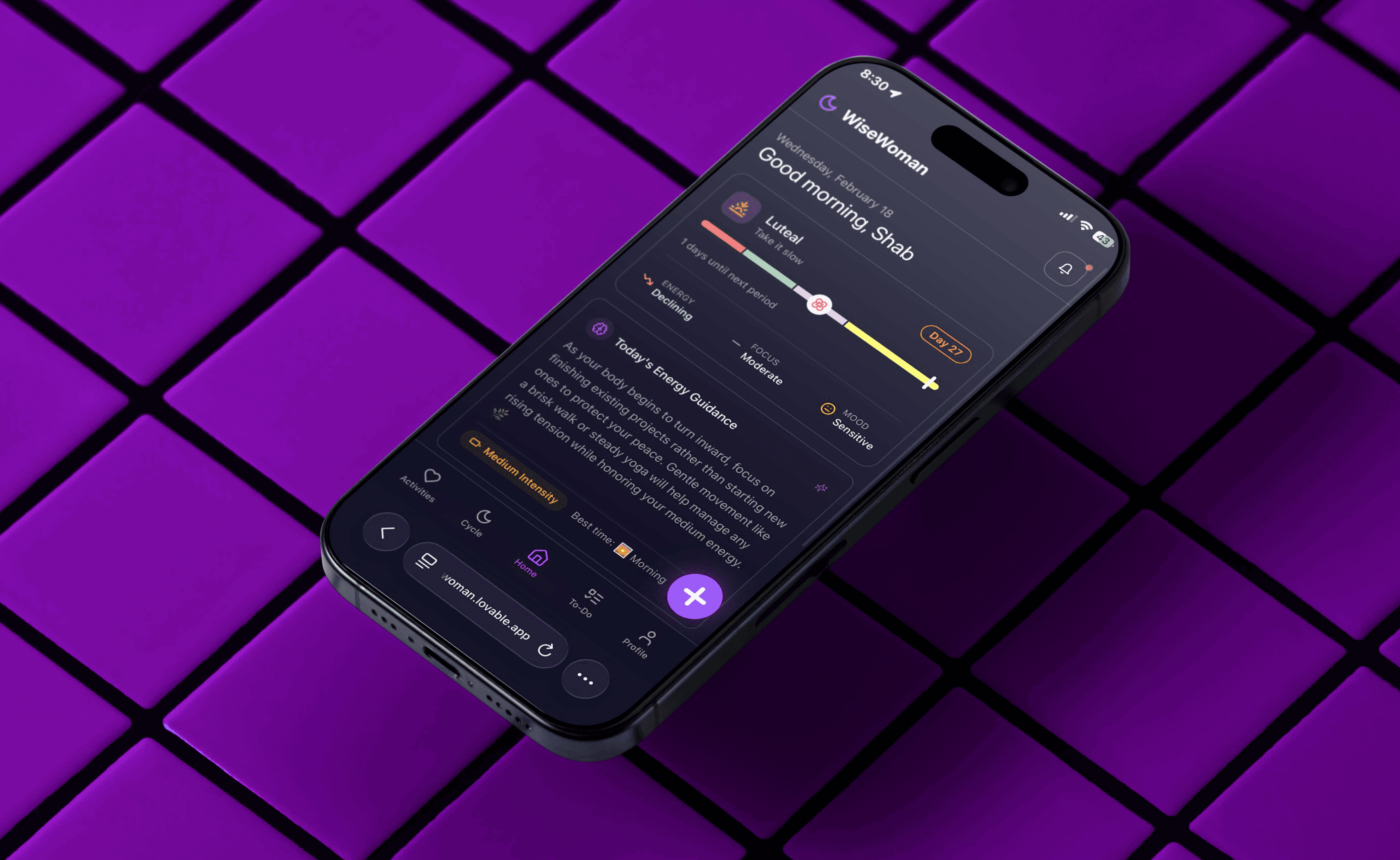
WiseWoman: Building a Cycle-Aware AI Planning System
productivity
b2c
mobile app
vibe-coded
MVP
September 2025
Role
Product Designer : End-to-End
(Research, System Design, Interaction, AI Logic)
Stack
Lovable Cloud · Gemini 2.5 Flash · Google OAuth · Supabase-style architecture
Outcome
AI Product MVP
Timeframe
5 days
Over View
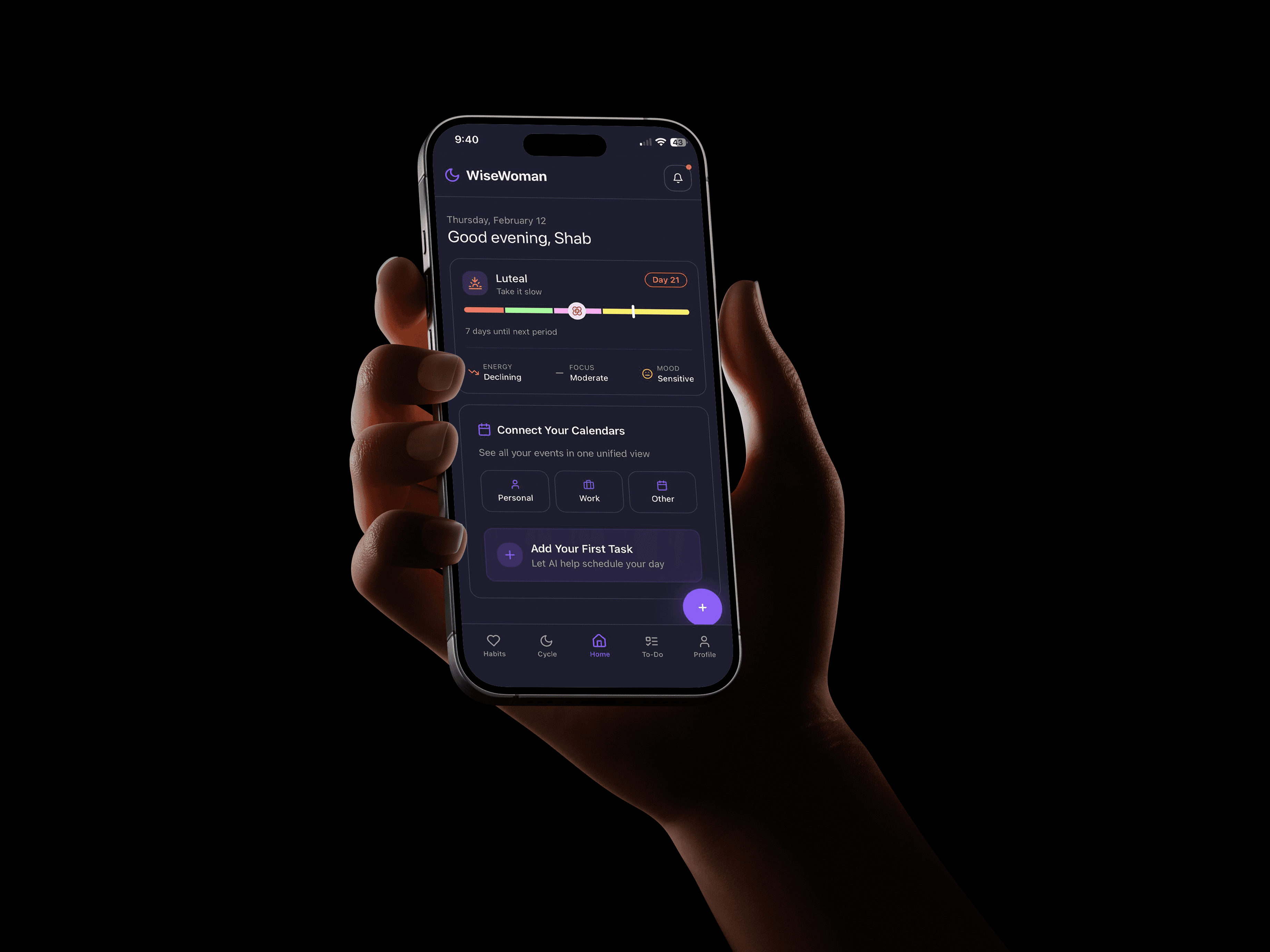
WiseWoman is an AI-native mobile MVP that explores how productivity systems can adapt to women’s biological rhythms and multi-role responsibilities.
Traditional planners optimise for task completion.
WiseWoman rethinks planning as a contextual system — one that interprets voice input, maps tasks to life roles, evaluates cycle phase energy, and generates a unified daily schedule across work and personal domains.
This project examines how AI can reduce cognitive load instead of adding configuration overhead.
Where Productivity Systems Break
Women do everything. From work deadlines to dinner plans, from toddler tantrums to remembering who wears what shoe on which day—all while somehow running on fumes. Invisible labor? Cognitive overload? Mental exhaustion? It’s the triple threat no app wants to acknowledge.
Women’s lived reality
What women need
Multi-role, context-switching, energy-variable
Context-aware planning, Reduced manual setup, Energy-aligned scheduling, Visibility into invisible labour
What productivity apps track
Tasks treated as isolated items ,No role awareness, No energy awareness
1
Roles and Energy Context Are Ignored
Most productivity tools treat tasks as role-neutral and capacity-stable.
They fail to account for overlapping identities and cyclical shifts in focus and stamina
2
Manual Task Creation Increases Cognitive Load
Users must type, tag, prioritise, and schedule tasks manually.
This shifts organisational work onto individuals already managing invisible coordination.
3
Fragmented Tools Hide Total Workload
Professional, domestic, and personal responsibilities live across separate systems.
Without unified tracking, users cannot see or measure their full labour distribution.
Design Process
I was building this for personal use first, i went ahead with secondary research to validate my hypothesis, found real pain points, conceptualised a solution - MVP with Lovable + Chat GPT + Supabase
Talked to working women
Mapped recurring friction patterns
Audited 12 productivity and femtech apps
Identified gaps in role awareness and cycle-based planning.
Problem Validation
Define the Direction
Clarified core hypothesis
Reduced scope to an AI-assisted MVP
Focused on reducing manual task structuring
Defined task → role → cycle → schedule flow
Defined app scope and features
Wireframe a layout
Design the System
Build the MVP
Layout Design in Figma
Built using Lovable
Google Auth set up
Integrated voice parsing and Google Calendar
Tested AI categorisation and tracking logic
Fixed workflow and UX breaks
Troubleshot Calendar sync and OAuth issues
Scope and logic refining
Scope and logic refining
Re-tested full user journeys
Iterate & Refine
Research & Pattern Synthesis
Reviewed Reddit threads (r/productivity, r/workingmoms, r/TwoXChromosomes), analyzed user reviews of Todoist, Notion, Google Calendar, and Flo, and conducted informal conversations with 3 working women. Clustered recurring pain patterns to identify core problems. Kept it honest—no inflated sample sizes.
Women average 4.8 hrs unpaid work daily; men 1.6–2 hrs
Source: OECD (2023), Gender Inequality in Time Use (SDG Indicator 5.4.1) ; Dean et al. (2022), University of Bath — Mental Load Study.
7 in 10 mothers carry the majority of household planning tasks, increasing cognitive load
Source : IJIP (2025), Vol. 18, Issue 1 — Work–Family Role Conflict and Mental Load Study, University of Bath — Mental Load Study.
Luteal phase linked to increased fatigue and reduced focus
Decision fatigue increases as daily planning complexity rises.
Mobile users interact with ~18 apps per day on average.
Only 5–10% of productivity app users remain after 30 days
Industry insight: Women download ~90% more productivity apps and spend ~87% more on paid apps.
Findings are grounded in OECD time-use data, University of Bath mental load research, and peer-reviewed studies on work-family strain and menstrual cycle-related energy fluctuations. Industry behaviour insights drawn from AIMA Review (2017), App Annie (Data.ai) State of Mobile Reports, 2019–2023.
Managing the tool is a work !
It takes more time to manage the tool than to actually do the work.
PMS is a thing !!
Sometimes I'll be great, locked in, getting loads done, then the next week or so later I'll have a couple of days where I just can't focus on ANYTHING and I'll get all the rest of the PMS symptoms.
Not for personal management
That most productivity/task management apps are created with companies in mind. I get that obviously people need these kind of apps at work and for team collaboration, but I wish there were more options created with personal growth and personal management as their primary goal.
Organising the task is a pain
We inherently know what needs to be done; it's the act of organizing those tasks that can feel overwhelming
User pain points were collected from Reddit discussions (r/productivity, r/workingmoms, r/TwoXChromosomes, r/todoist) and App Store and Google Play reviews of productivity tools.
High-Accountability Planners
Women with disproportionate unpaid labour and overlapping work-family demands operate under sustained cognitive strain. Traditional planning systems assume stable capacity, but high-accountability planners navigate fluctuating energy, invisible coordination, and constant role overlap.
Competitive Landscape & Market Opportunity
The market separates biological insight from daily execution. FemTech apps interpret hormonal data. Productivity tools optimise task completion. No dominant player orchestrates workload based on biological capacity and role context. This structural gap creates space for capacity-aware planning infrastructure.
Product
Category
Core Offering
Key Limitation
Flo / Clue
FemTech
Cycle tracking & hormonal insights
No task or productivity integration
Phase / The Essence / The Agenda
FemTech + Productivity
Cycle-aware task suggestions
Surface-level planning; no deep infrastructure or AI
Todoist / Notion / Google Calendar
Productivity
Task & schedule management
No biological context or role-based workload logic
WiseWoman
FemTech + Productivity
Cycle-aware, AI-structured, role-based planning with multi-calendar sync
Early-stage entrant
Market Signal and Sizing
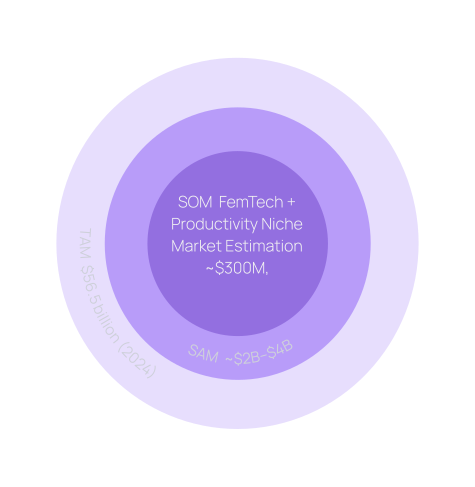
The global FemTech market was about $56.5 billion in 2024, growing at ~15.5% CAGR to reach about $206.8 billion by 2033
Menstrual health app segment estimated at ~$2–$4B globally, with projected double-digit CAGR through 2030.
Productivity software projected to surpass $18B by 2030
FemTech has attracted $2B+ in venture funding since 2018,
Cycle-tracking leaders like Flo and Clue have raised $100M+ combined,
Structural Gap in a High-Growth Market
FemTech is expanding rapidly, yet biological insight and daily execution remain product silos. Cycle apps track; productivity tools schedule. No category leader translates hormonal capacity into structured workload orchestration. WiseWoman positions itself as infrastructure at this intersection of biological intelligence and operational planning.
Sources
PitchBook (2018–2023 FemTech Funding Reports)
Rock Health – Digital Health Funding Reports
Public disclosures: Flo Health, Clue
Fortune Business Insights – Menstrual Health Apps Market Size, Share & Industry Analysis
Grand View Research – FemTech Market Size & Trends Report
Product Strategy & Intelligence Design
WiseWoman is designed as a cycle-aware planning system that adapts to changing capacity. The product strategy centers on reducing cognitive load through structured logic, selective intelligence, and clear boundaries between assistance and automation. Every decision from rule-based scheduling to lightweight AI parsing prioritizes clarity, control, and friction reduction over complexity.
Core System Logic
Cycle phase → Energy pattern → Role context → Task grouping → Daily plan
The planner interprets cycle signals, maps tasks to roles, and structures the day based on available capacity.
Design Principle
Reduce manual structuring
Increase contextual intelligence.
Make planning feel aligned, not forced.
This is not a period tracker with tasks attached. It is a planner designed around fluctuating capacity.
Intelligence Design
Where AI Is Used
Reduce Natural language and voice → structured tasks structuring
Daily energy guidance based on cycle phase
Remembering user corrections over time
AI is used selectively, only where interpretation reduces friction. This keeps input lightweight while allowing small adaptive improvements.
Feature
How It Works
AI
Why
Task Capture (Text & Voice)
Parses natural language into structured fields: task, role, time, intensity
Lightweight NLP
Reduces cognitive load during input
Task Categorisation
Keyword + role mapping with user correction memory
Rule-based + learning loop
Fast, explainable, improves without retraining
Energy Guidance
Generates short phase-aware daily nudges
LLM-based
Interpretation + tone require generative intelligence
Schedule Structuring
Priority sorting + slotting around calendar events
Deterministic algorithm
Predictable, stable, and transparent
Behaviour Memory
Stores corrections and completion metadata locally
Pattern memory
Personalisation without heavy ML
Learning & Personalisation
Lightweight personalization
Adaptive tagging over time
No model retraining cycles and Opaque models
User corrections are stored locally and checked before rules execute.The system improves within boundaries.
Technical Constraints & Trade-offs
MVP Scope is a Lovable web application rather than a native app for rapid prototyping and iteration.
Prioritised deterministic algorithms over full LLM scheduling to maintain MVP Scope
Behavior & Habit Feedback Loop
Task completion is tracked locally to build pattern awareness across days and weeks. This creates lightweight personalization without complex modeling. The goal is reflection, not automation.
Design Decision
Generative AI is limited to guidance and parsing. It does not autonomously schedule or override tasks. The system assists. The user decides. This preserves agency while still reducing cognitive load.
Experience Strategy & Interaction Design
WiseWoman translates cycle intelligence into usable daily interactions. Every screen reduces planning friction, aligns workload with biological capacity, and eliminates manual structuring overhead. WiseWoman adapts planning to biological rhythms and real-life roles.
Branding and Colours
The planner interprets cycle signals, maps tasks to roles, and structures the day based on available capacity.
#8B5CF6
#B08CF5
#F2F2F2
#1A1832
#181630
#252538
#29293D
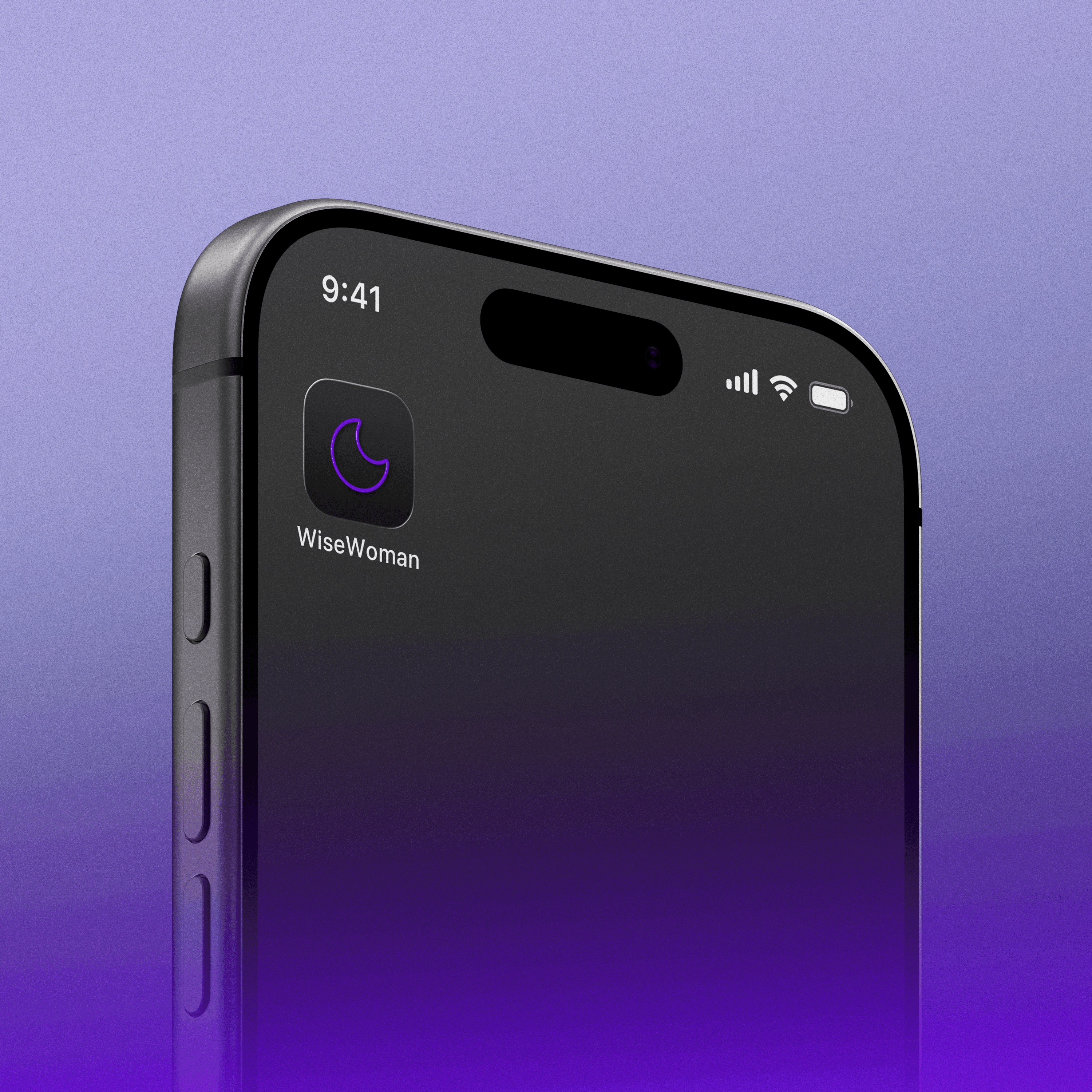
Cycle Symbol in the app logo
The WiseWoman logo uses the moon as a symbol of cyclical change. Just as the moon moves through visible phases, energy and focus shift across the menstrual cycle. The mark represents adaptive planning that honors rhythm instead of forcing constant output.
Intentional Onboarding Design
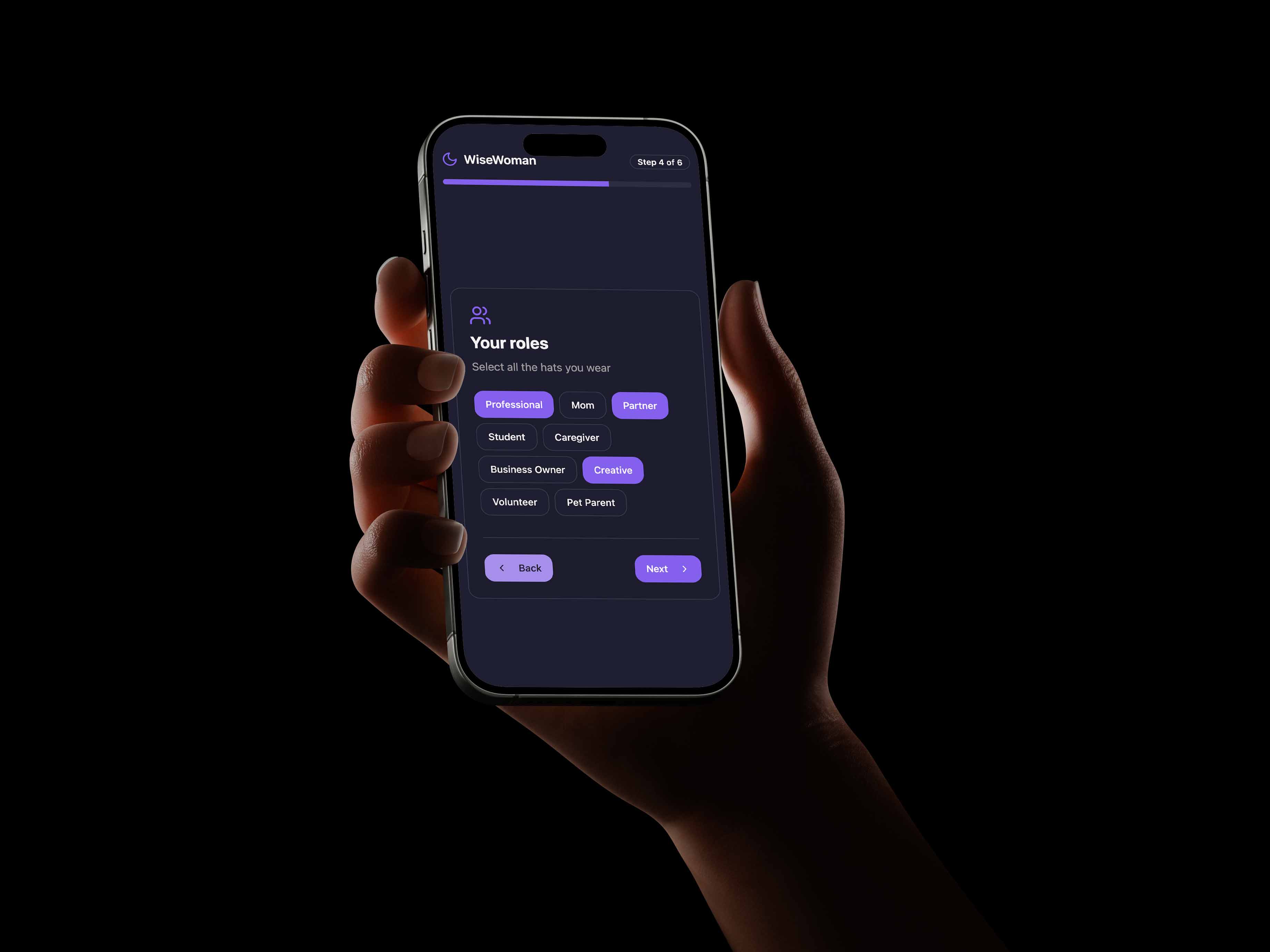
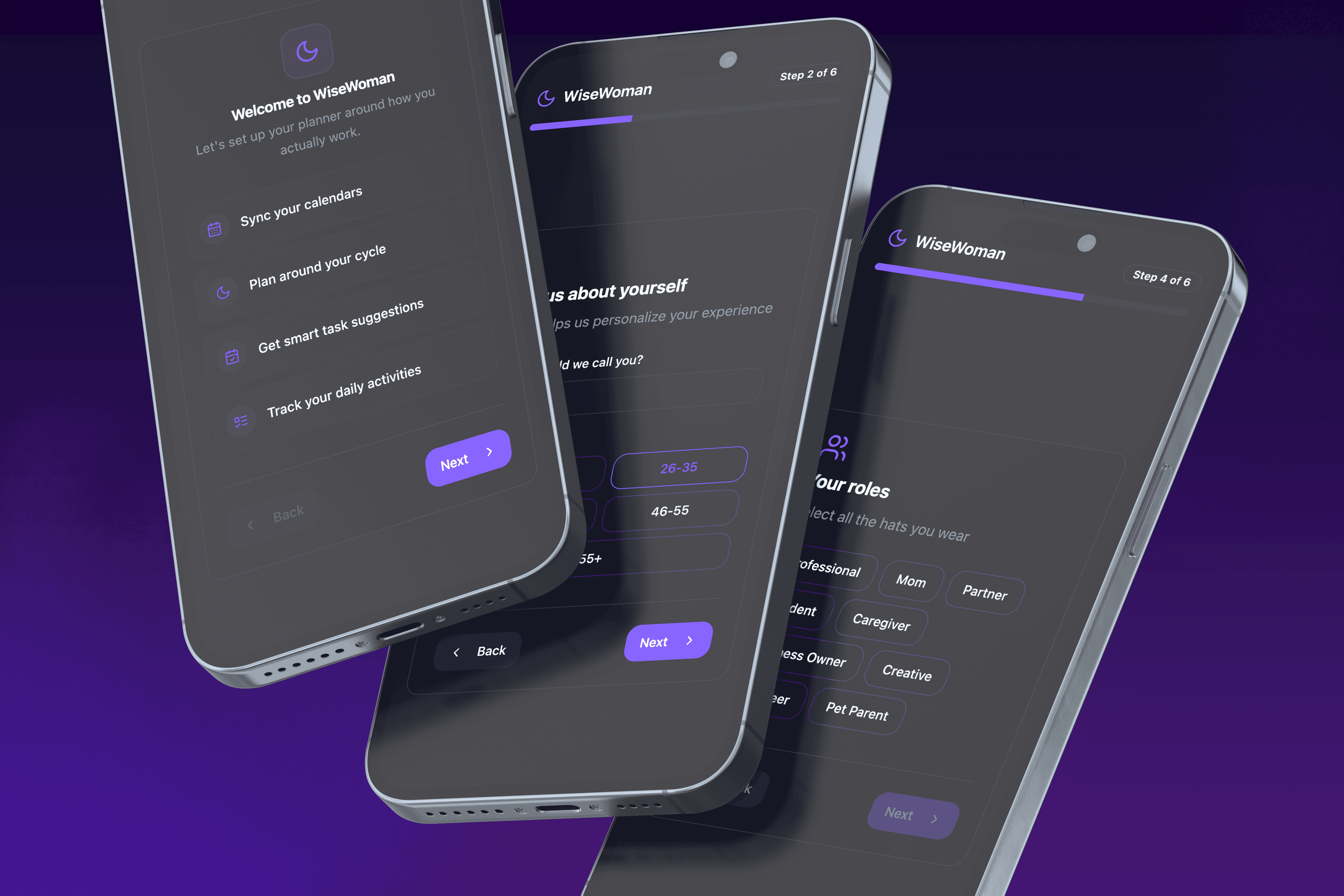
The onboarding is intentionally structured to collect only high-signal inputs required for cycle-aware planning: basic identity, cycle data, and role context. Each step directly feeds the planning logic — cycle prediction, capacity mapping, and role-based task grouping. No excess preferences, no unnecessary profiling. The goal is fast personalisation with minimal friction.

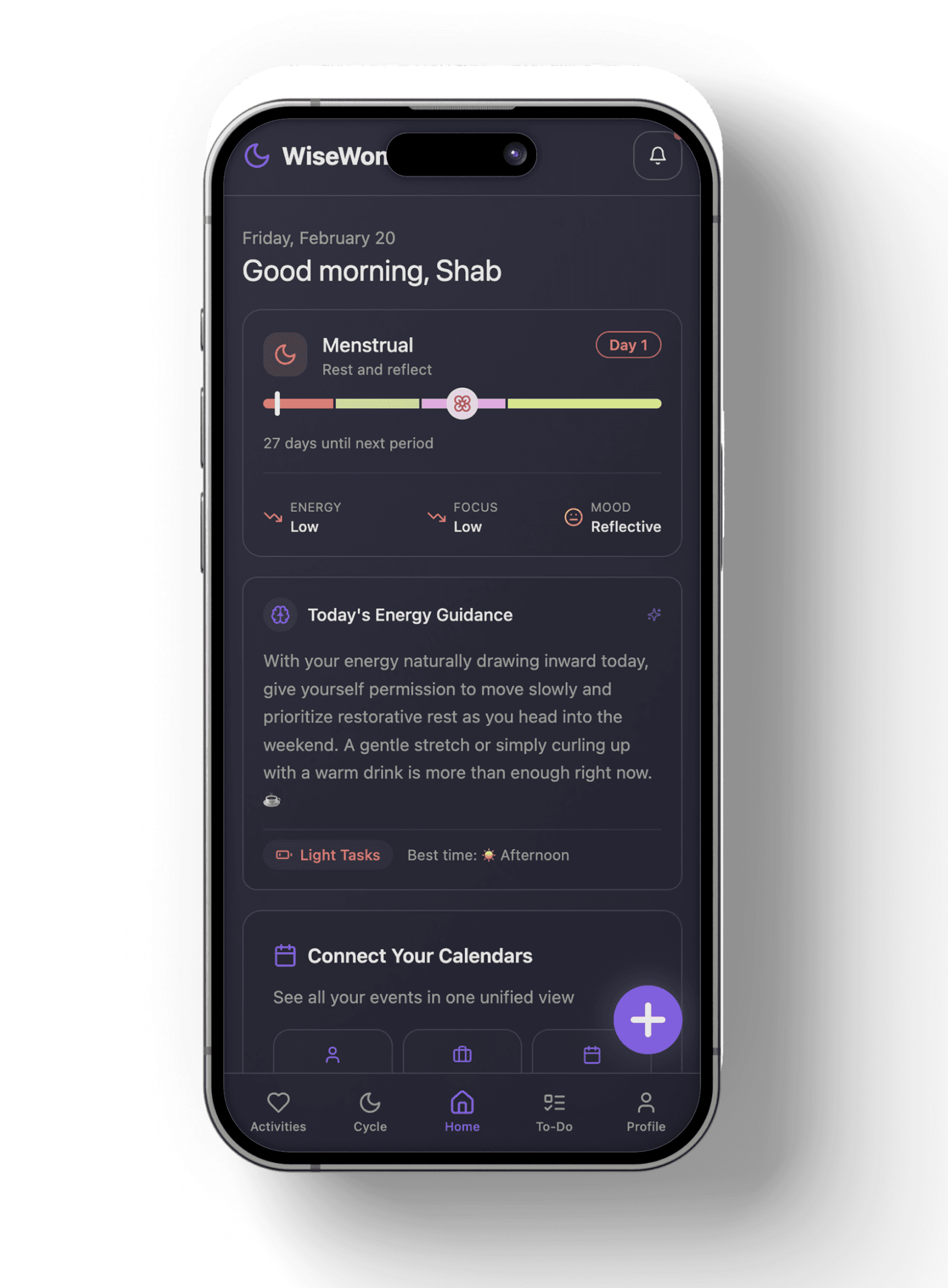
Contextual Home Interface
The onboarding is intentionally structured to collect only high-signal inputs required for cycle-aware planning: basic identity, cycle data, and role context. Each step directly feeds the planning logic — cycle prediction, capacity mapping, and role-based task grouping. No excess preferences, no unnecessary profiling. The goal is fast personalisation with minimal friction.
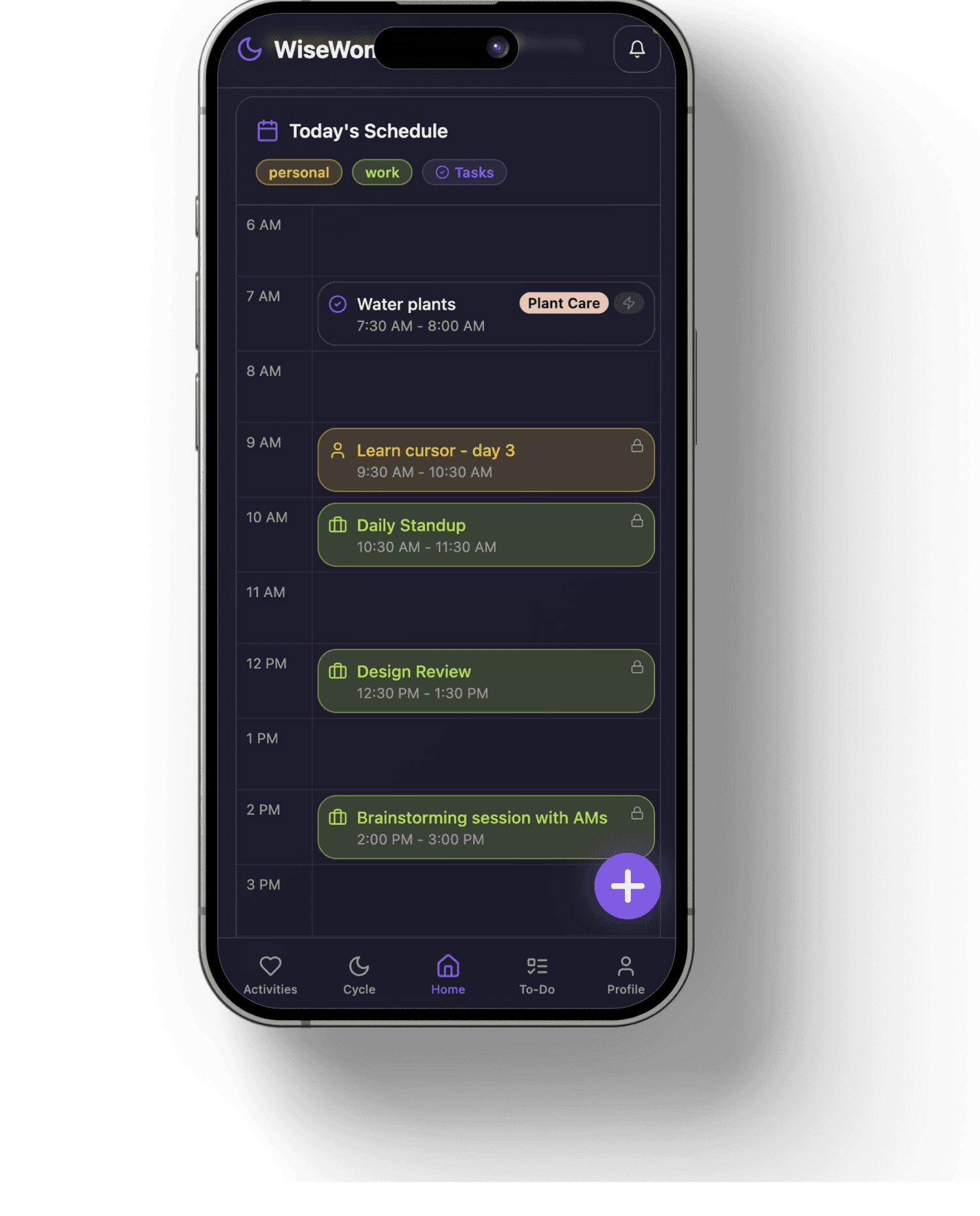
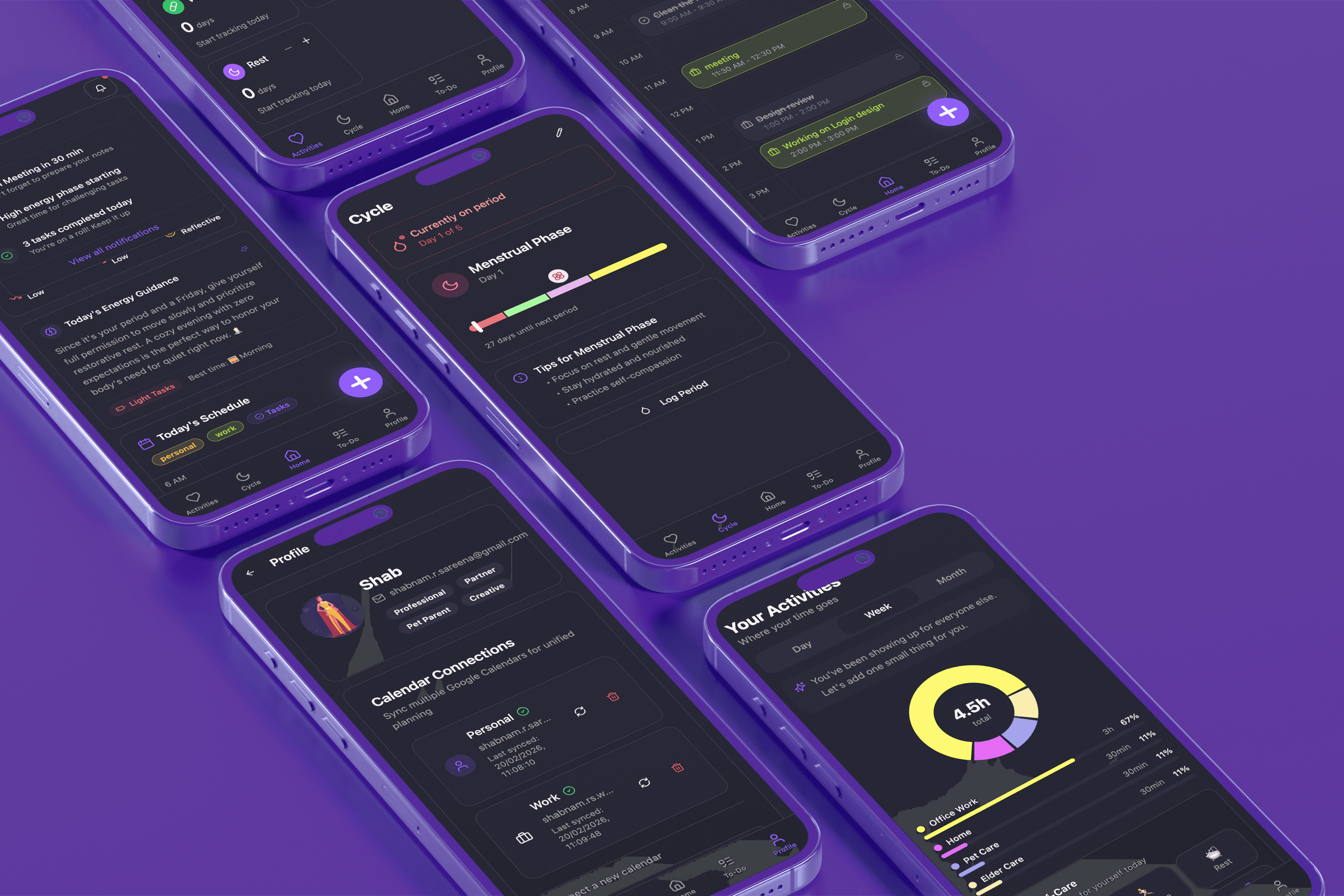
Your Daily Schedule
A single, unified view of the day across work and personal roles. External calendar events and in-app tasks live together, reducing context switching.

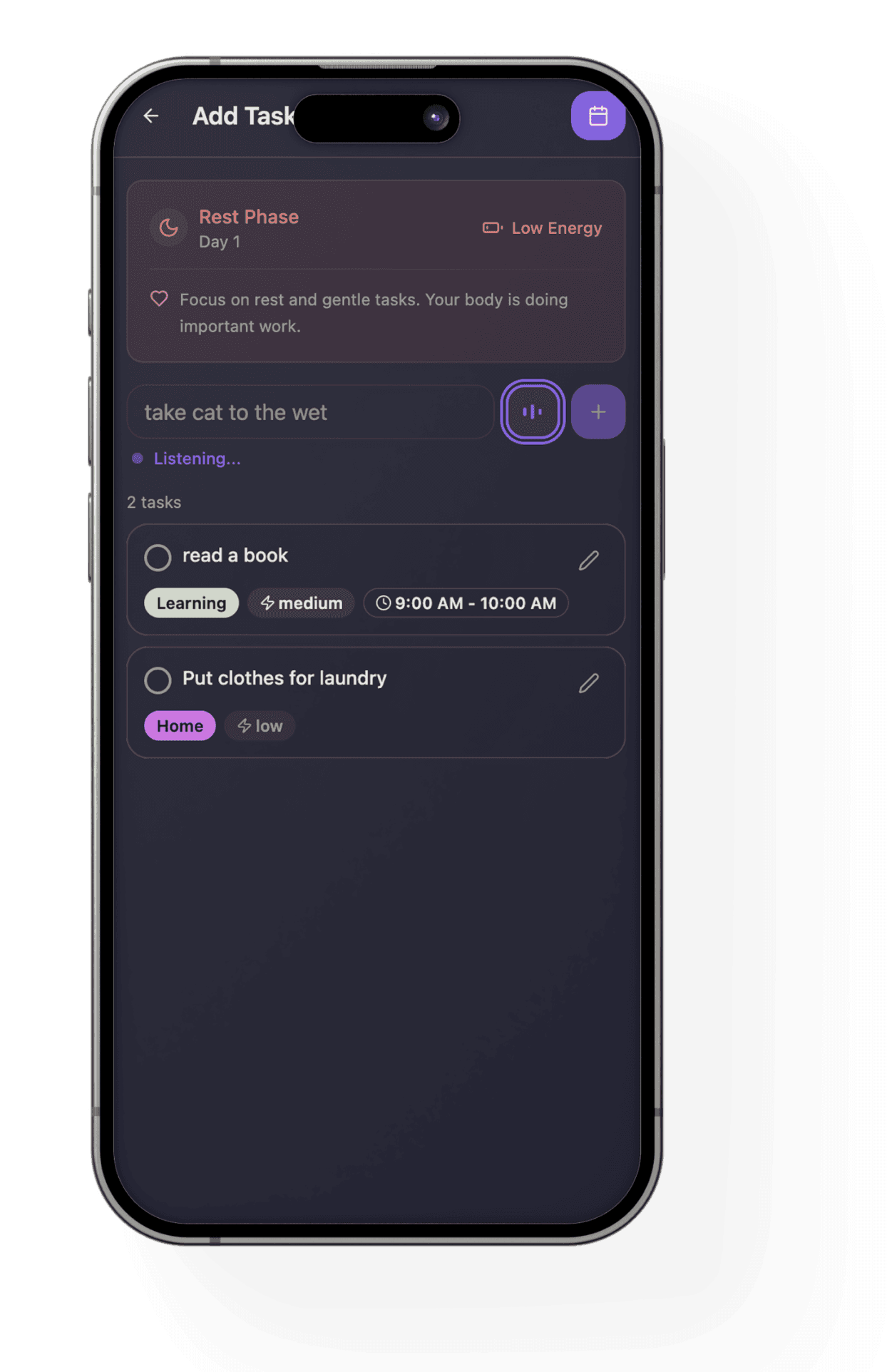
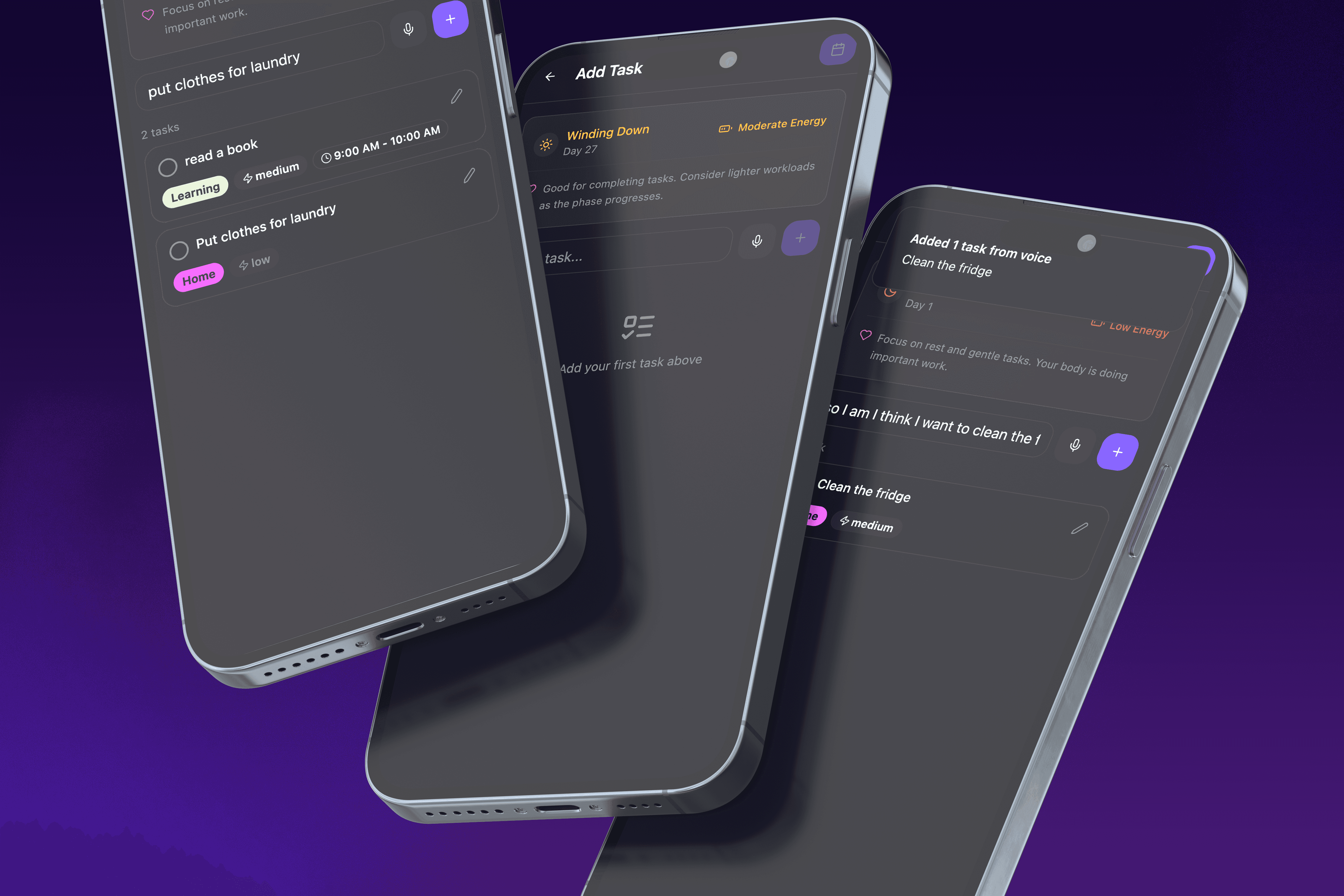
Intelligent Task Capture
Users add tasks via text or voice. The system auto-categorizes them by role and intent, then provides cycle aware nudges to guide timing and workload.
Final scheduling remains user-controlled.
Task Creation & Intelligent Scheduling
Task capture is designed to reduce cognitive overhead from the start. Natural language input is interpreted using lightweight NLP to extract intent and auto-map tasks to life roles with suggested energy intensity. This removes manual tagging and micro-decisions at the point of entry.
Over time, user edits and corrections act as feedback signals, refining classification and scheduling suggestions. The system gradually aligns with individual planning habits, making structuring feel increasingly intuitive rather than configured.
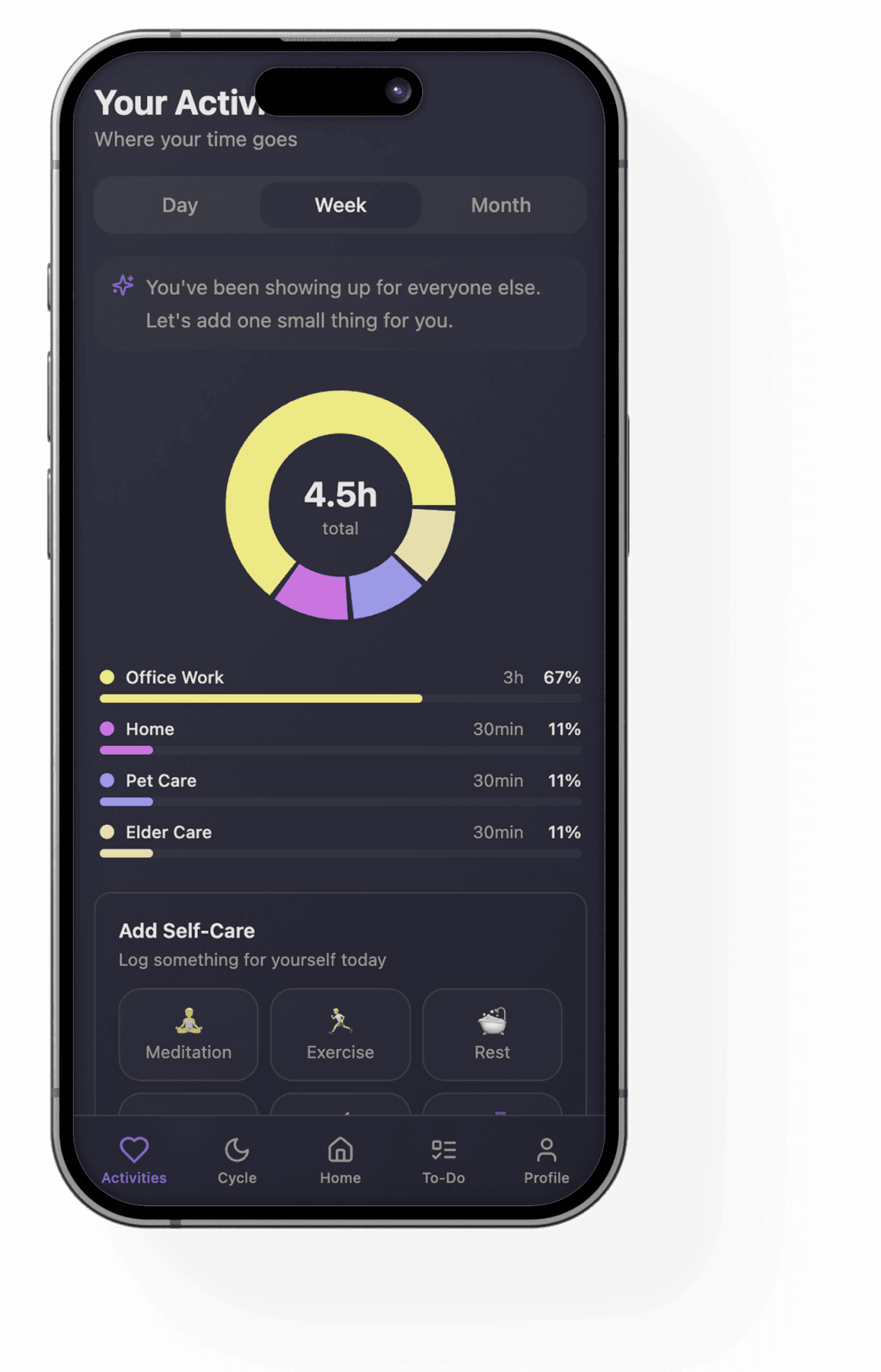
Habit Reflection & Tracking
The habit section translates completed tasks and synced events into visible behavioral patterns. Instead of manually logging habits, the system derives insight from actual daily activity across roles.
It surfaces where time is spent, how workload is distributed, and what routines are forming over days and weeks. The goal is awareness, not streak pressure — helping users understand their lived patterns rather than optimize obsessively.

Your Activities Dashboard
Your Activities tracks completed tasks and synced events across day, week, and month views. It visualises where time goes across roles without requiring manual logging. Users can also add small self care actions from here.
Check Out the web app
Reflections & Future Scope
Building WiseWoman clarified where AI meaningfully supports planning and where human judgment must remain central. The process was iterative, constraint-led, and grounded in real system limitations.
What Worked
Built a working MVP around a problem gap I identified independently.
Implemented real Google OAuth and calendar integration, gaining hands-on exposure to authentication and live system constraints.
Tested task logic, role mapping, and scheduling flows in a functional environment, not just static mockups.
Designed alongside live integrations, refining UI decisions based on real calendar behavior rather than assumptions.
What did not Work
Calendar sync and OAuth configuration took multiple debugging cycles.
Multi-calendar handling introduced errors duting building costing time and prompts
Task creation logic broke repeatedly before stabilising.
Prompt precision directly impacted system reliability.
UX refinements required repeated restructuring of flows.
Current State
The system is in active testing. Core flows are stable, but real-world validation is ongoing.
Future Scope
As usage data grows, the system can evolve toward deeper behavioral personalization. With more signals over time, planning suggestions can become more adaptive while preserving user control. Future iterations may explore native deployment and more advanced pattern recognition, but the core principle will remain: assist, do not automate.