Health Insurtech
B2B SaaS
Web Application
April 2025
Reimagining IHX Nucleus
Ops Dashboard
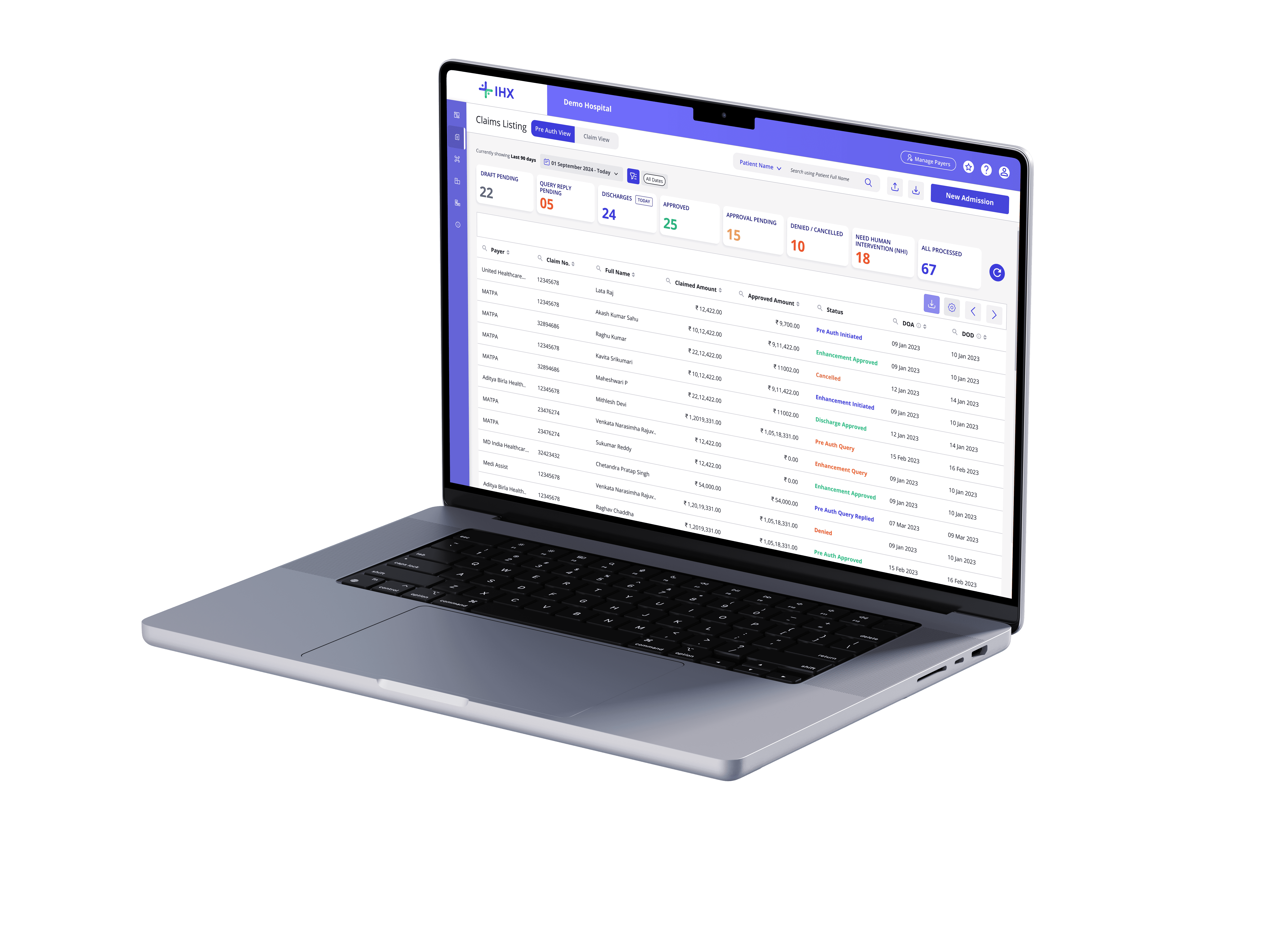
A 4-bucket layout was hiding a multi-stage, two-team operation across 35 insurance payers. Nobody had fixed it because nobody had asked how hospital teams actually work. We did.
ROLE
Product Design · UX Research · IA · UI · Prototyping
TEAM
1 PM · 1 PD (me) · 2 Developers
TIMEFRAME
3 weeks — Mar–Apr 2025
ALSO COVERED
Dev Handoff · Design Review · Stakeholder Management
↑67%
Revenue per claim
3
Enterprise contracts
4.6
Improved CSAT
3 weeks
Brief to Sprint
01 — Platform Context
What is IHX?
The digital backbone for hospital insurance operations across India. Hospitals manage the full claim lifecycle without logging into 35 different insurer portals.
2,00,000+
Claims processed monthly
15,000+
Active hospitals on platform
40%
India's overall claim volume
35 Payers
Insurance payers connected
ARCHITECTURAL REALITY
Of 35 payers: 7 via direct API · 28 via RPA and email extraction. When automation fails, claims disappear. The hospital has zero visibility. We had to design for that failure mode.
02 — Problem Framing
The Brief vs The Real Problem
The digital backbone for hospital insurance operations across India. Hospitals manage the full claim lifecycle without logging into 35 different insurer portals.
THE BRIEF
"Redesign the dashboard"
Make it look better. Clean up the UI. Better visual design.
ASSUMPTION
This is a UI problem.
Hospital needs
An easy way to manage claims
Business goals
Retain hospitals and secure new ones
VS
THE REAL PROBLEM
Information Architecture
A multi-stage, two-team operation — pre-auth, enhancement, discharge, settlement, reconciliation across 35 payers — flattened into 4 buckets and called it a Operations Dashboard.
ROOT CAUSE
Information architecture problem, not a UI problem.
Why we should solve this
When hospital staff cannot find what they need, queries go unanswered, discharges get delayed, and IHX loses the client.
"The platform had been inherited from a parent insurance company. When IHX became its own entity, nobody had gone back and asked how hospital teams actually work. The screen reflected the logic of the company that built it — not the people using it."
From discovery research
03 —What the Data Showed
Three sources of evidence shaped the direction before any design decisions.
Hotjar session recordings, Google Analytics event data, and user feedback direct and indirect routed through account managers gave three different angles on the same problem.
Hotjar — Session Heatmap
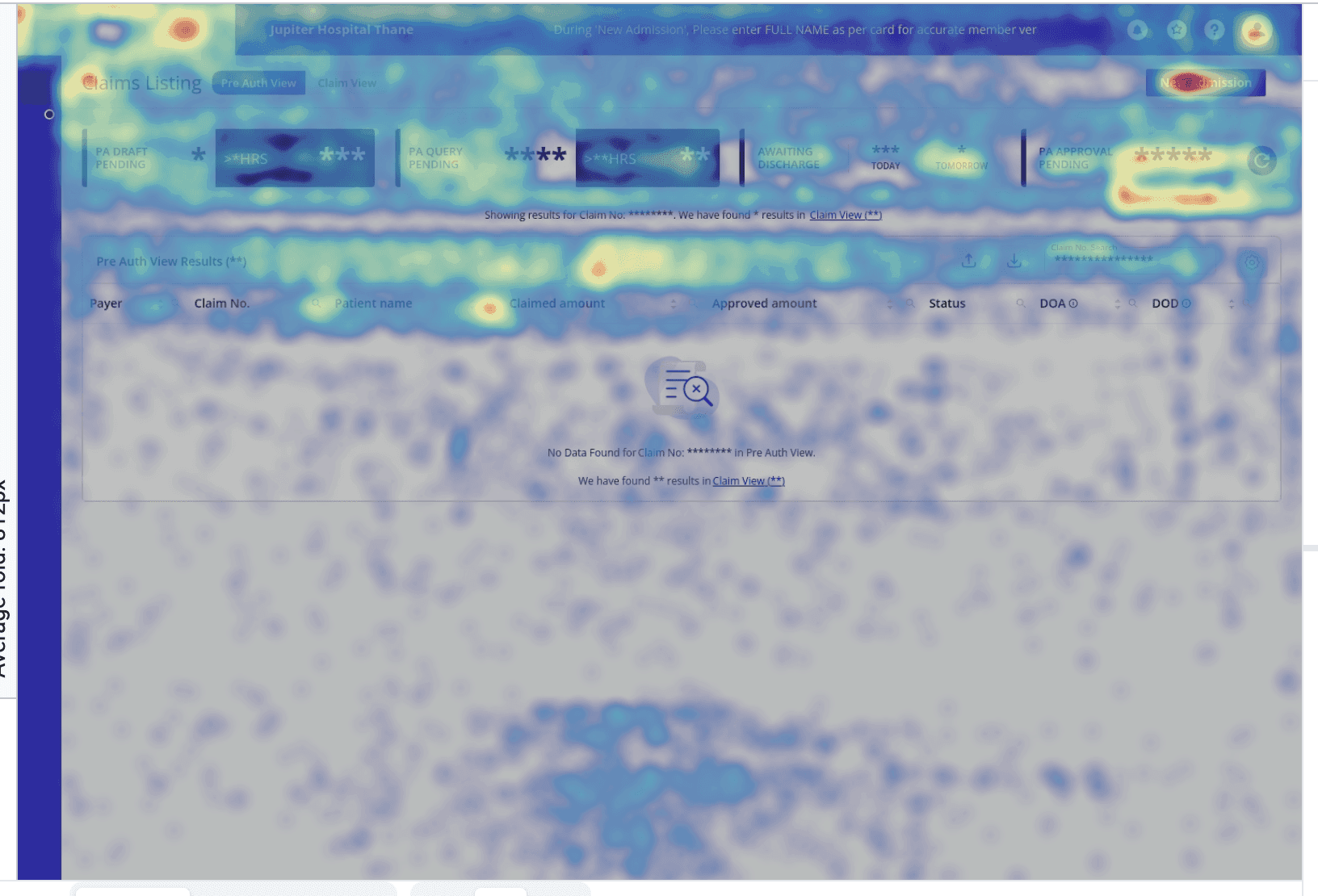
The heatmap showed heat concentrated at the top of the screen. New Admission, the search fields, and the Approval Pending bucket. The table body was cold. Users were not browsing. They were searching.
Google Analytics — Events Data
80%+
Of all column level searches used just 2 parameters: Patient Name, Claim Number. UTR had low usage but stays essential for Claim team
From discovery research
Reading across both sources — the cold table in Hotjar and 42% of search events concentrated on just two parameters in GA — the pattern points to one conclusion: users were not finding what they needed through the bucket structure. They were relying on search as a workaround.
Synthesis across Hotjar + GA
User Comments
"If there's a query pending at the discharge stage, I don't even get to know. I can't tell my team to start working on it."
Hospital Insurance Head
"Our claims are all mixed up. Patients come and ask us whats the status, i have to search the claim every time, we are really busy you know ?"
Hospital Insurance Staff
"So much work! I keep searching for claims ready for discharge. If I miss one, patient discharge gets delayed and my supervisor scolds me"
Hospital Insurance Staff
"Hospitals scold us asking why are we paying, why cant you guys add global search feature ?"
IHX Account Managers
15+
Users interviewed
5+
Hospitals covered
6+
Teams represented
04 — Understanding the Users & Ecosystem
A hospital insurance operation
is not one workflow. It is two.
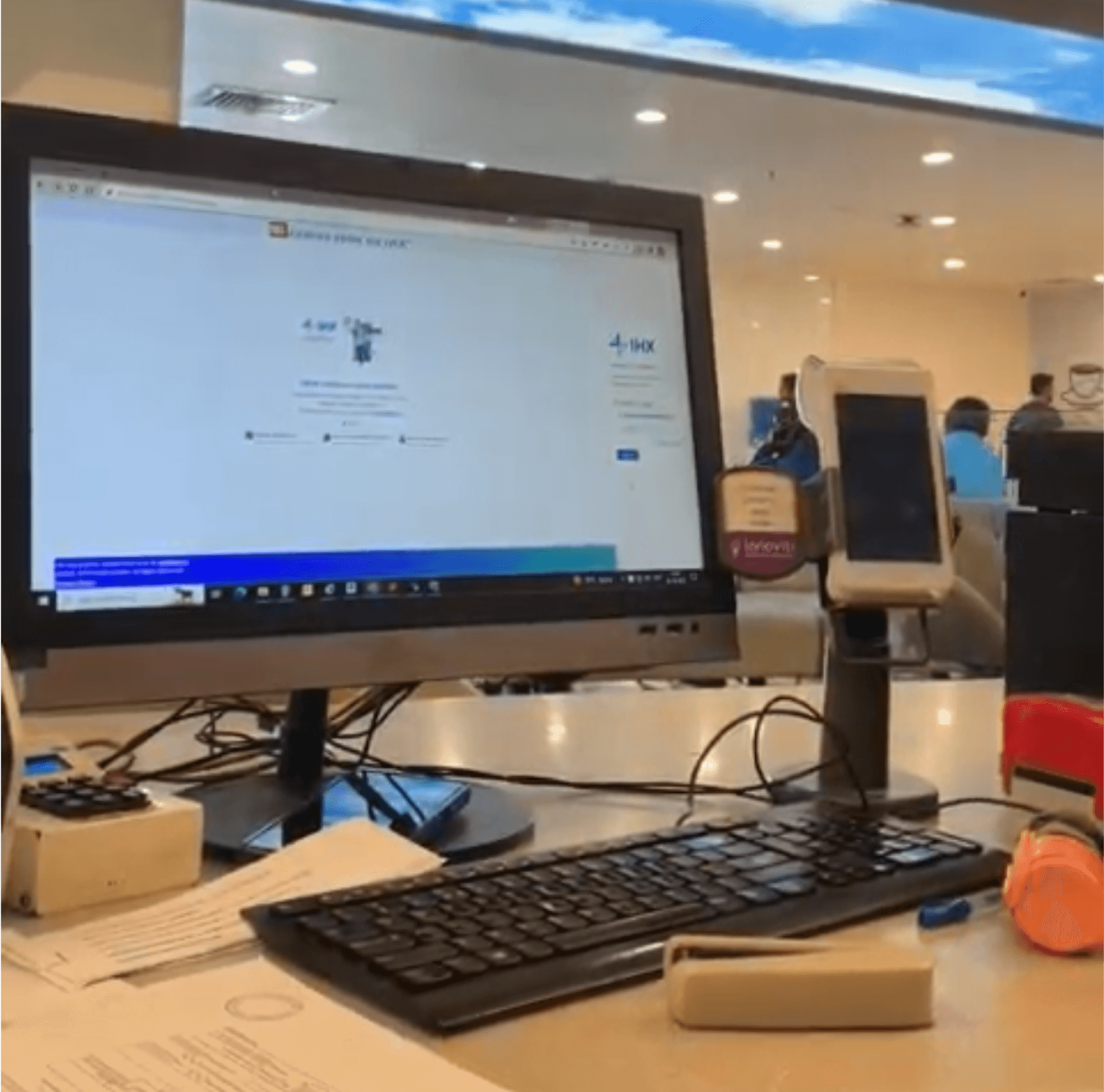
I spoke with account managers, sat with the PM, and had direct conversations with hospital staff. What I found was two distinct operations — each with different pressures, timelines, and a completely different relationship with the platform.
Pre-Auth Team
⚡ TIME-CRITICAL
⚡ PATIENT FACING
— Initiates the claim before the patient is admitted
— Responds to insurer queries on missing documents or procedure clarifications
— Raises enhancement requests
— Initiates discharge when the patient is medically ready to leave
Every action is time-critical — an unanswered query increases TAT, a delayed discharge costs the hospital a bed/hour.
Claim Team
💰 FINANCE-CRITICAL
⚡ SETTLEMENT FOCUSED
— Submits the formal claim to the insurer after discharge is approved
— Initiates settlement in bulk at end of day across multiple payers
— Resolves finance-level queries that affect the settlement timeline
— Reconciles payments against the hospital contracted tariff / MOUs
Every delay means money already spent on care sitting unreturned, impacting operational capital.
Supervisors / Team Heads
⚡ TIME-SENSITIVE
⚡ MANAGEMENT CRITICAL
⚡ CXO FACING
— Opens the dashboard to understand the team's workload at a glance, not to take action directly
— If a query has been sitting unanswered, they will reach out to their staff immediately
—Needs to see counts across multiple sub-statuses simultaneously to assess team performance
The dashboard is a supervision and oversight tool, not an action tool
Every unanswered query and delayed discharge is visible to them first. They are accountable for the team's turnaround time.
ECOSYSTEM REALITY
The users work in a high pressure, highly sensitive environment. The user faces high cognitive load — talking to multiple patients, submitting cases, and answering queries by coordinating with department heads. They are easily frustrated when the platform adds to that load instead of reducing it.
From discovery research
Emotions
Relieved th discharge is approved
Frustrated about reporting work
Frustrated about checking again and again for claim statuses and needs to raise disputes
Patient and calm
neutral mind
Slightly overloaded with work
Stressed of workload
Pleasant about responding to queries
Tensed that senior informed about unreplied query
Anxious about missing other queries
Frustrated about having to check again and again
Worried about other queries
happy to notice a new claim
Stressed about responding to queries
Annoyed at having to work so much on reports
Relieved to find claims approved without disputes
Relieved the day is ending
Relieved numbers are tallying
Informs finance /senior of daily settlements
Pain Points
Missing info
Routine process
Repeated data entry.
High response time from insurers
Need to check each claim statuses by search
Actionable insight
Need to search for stage wise query
No bucket to search stage wise
Difficulty in claim search
repeated data entry.
No actionable for active cases
No stage level segregation of claims
Searching for queries
Checking MOUs, terms and conditions
Searching active cases statuses
Stage level segregated data to download
Searching active cases statuses
Reconcile claims with settled amount
Claim Lifecycle
User Group 1
User Group 2
Each claim is handed over to the other team. But teams have different work focus
USER JOURNEY MAPPING
Two teams. Two urgency profiles. Two completely different reasons to open the platform. The old UI treated them as one user with one need.
From discovery research
05 — Designing for the Existing Mental Model
Information Architecture Revamped
The problems weren't fixable at the surface because the surface was built on the wrong model. I had two options. Improve the existing screen or restructure the underlying information architecture. I chose the harder one.
New Information Architecture — Modular · Replicable · Scalable
Claim Listing Screen
Login to IHX Platform
Approval Pending
Query Reply Pending
Draft pending
Draft pending
Query Reply Pending
Claim Approved
PA Draft pending
PA Query Reply Pending
PA Approved
PA Appr Pending
PA Denied
Enh Approved
Enh Appr Pending
Enh Denied
Dis Approved
Dis Appr Pending
Dis Denied
Initiate Discharge
Enh Draft pending
Enh Query Reply Pending
Query Reply Pending
Dis Draft pending
Dis Query Reply Pending
Discharge Approved
Denied / Cancelled
NHI
PA Utilisation Pending
PA View
Claim View
Time/Date Filter
Time/Date Filter
Due For Discharge
Approved
PA View → Stage Buckets → Secondary Filters → Table | Cla`im View → Settlement Buckets → Secondary Filters → Table
THE SCALABLE ARCHITECTURE
The PA View / Claim View template with nested bucket, secondary filter, and table became the foundation for the Government Scheme module, Self-Funded Corporate module, Recon module, IHX Nucleus mobile app, and the Reporting & Analytics module — all on the same pattern without additional architectural work.
06 — Design Decisions
Key decisions and why.
The problems weren't fixable at the surface because the surface was built on the wrong model. I had two options. Improve the existing screen or restructure the underlying information architecture. I chose the harder one.
01
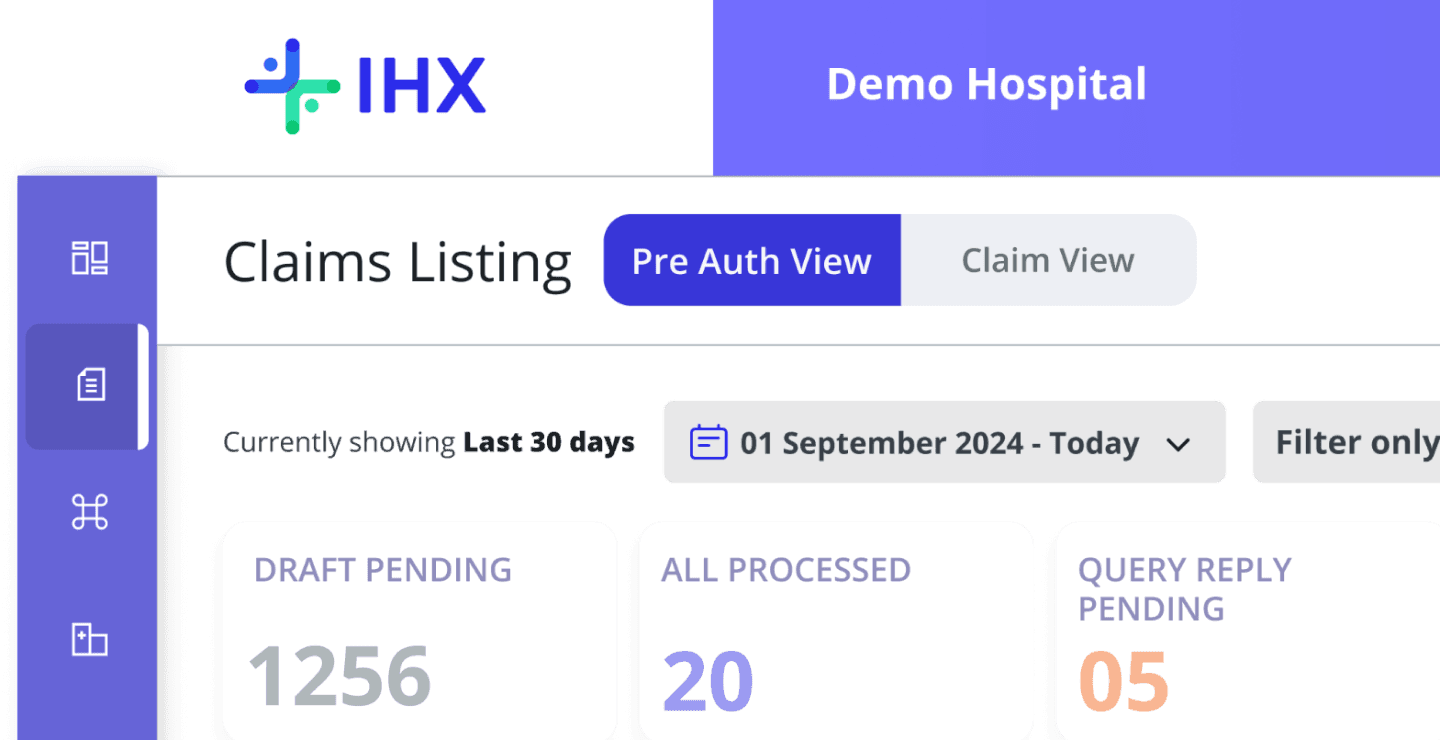
Separated PA View and Claim View at the primary navigation level
Two tabs, two user groups, two bucket hierarchies. Pre-Auth buckets are time-stamped — Awaiting Discharge shows today and tomorrow separately. Claims buckets are settlement-state-oriented. Navigation is a single click; cross-view search results redirect automatically.
Core IA Decision
02
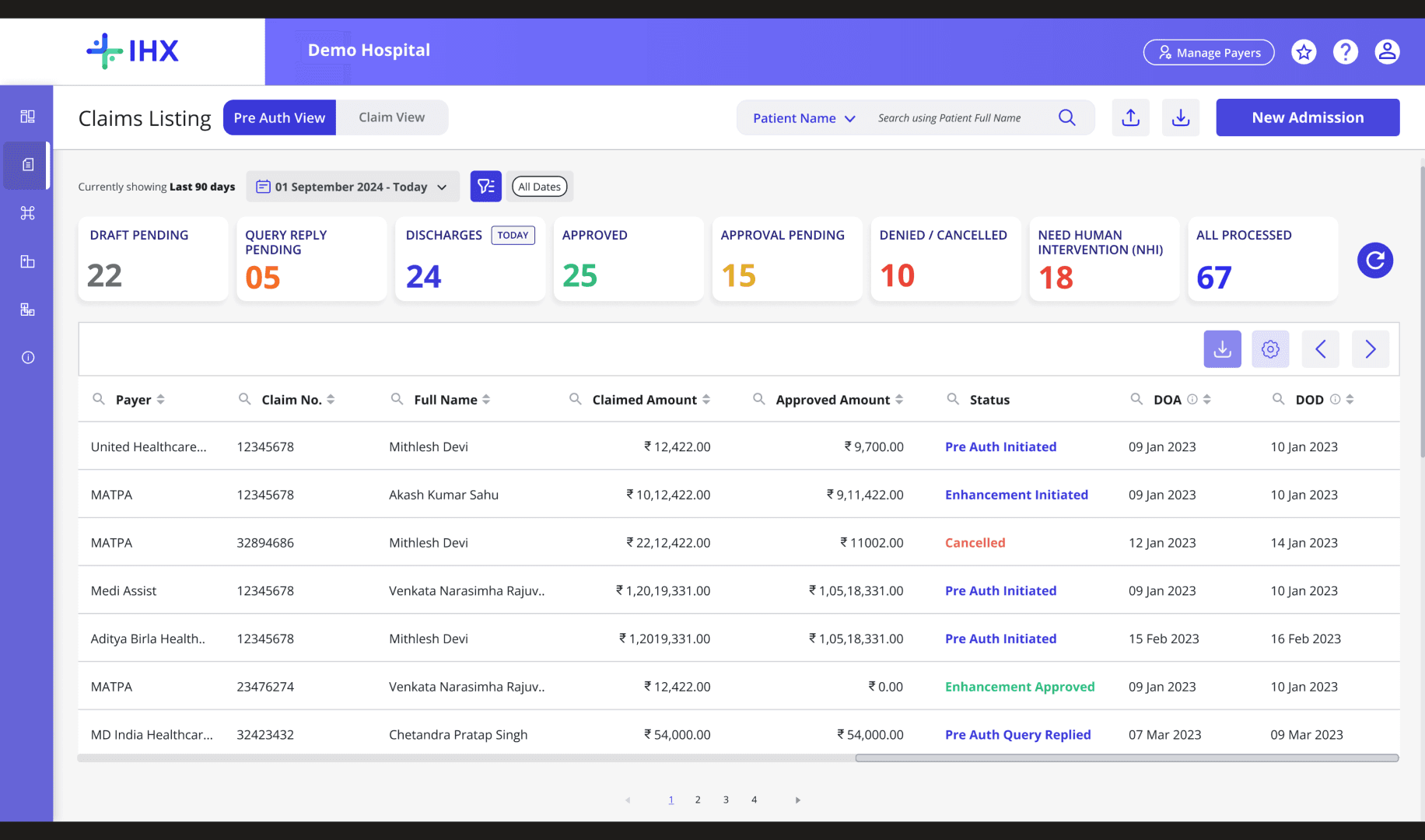
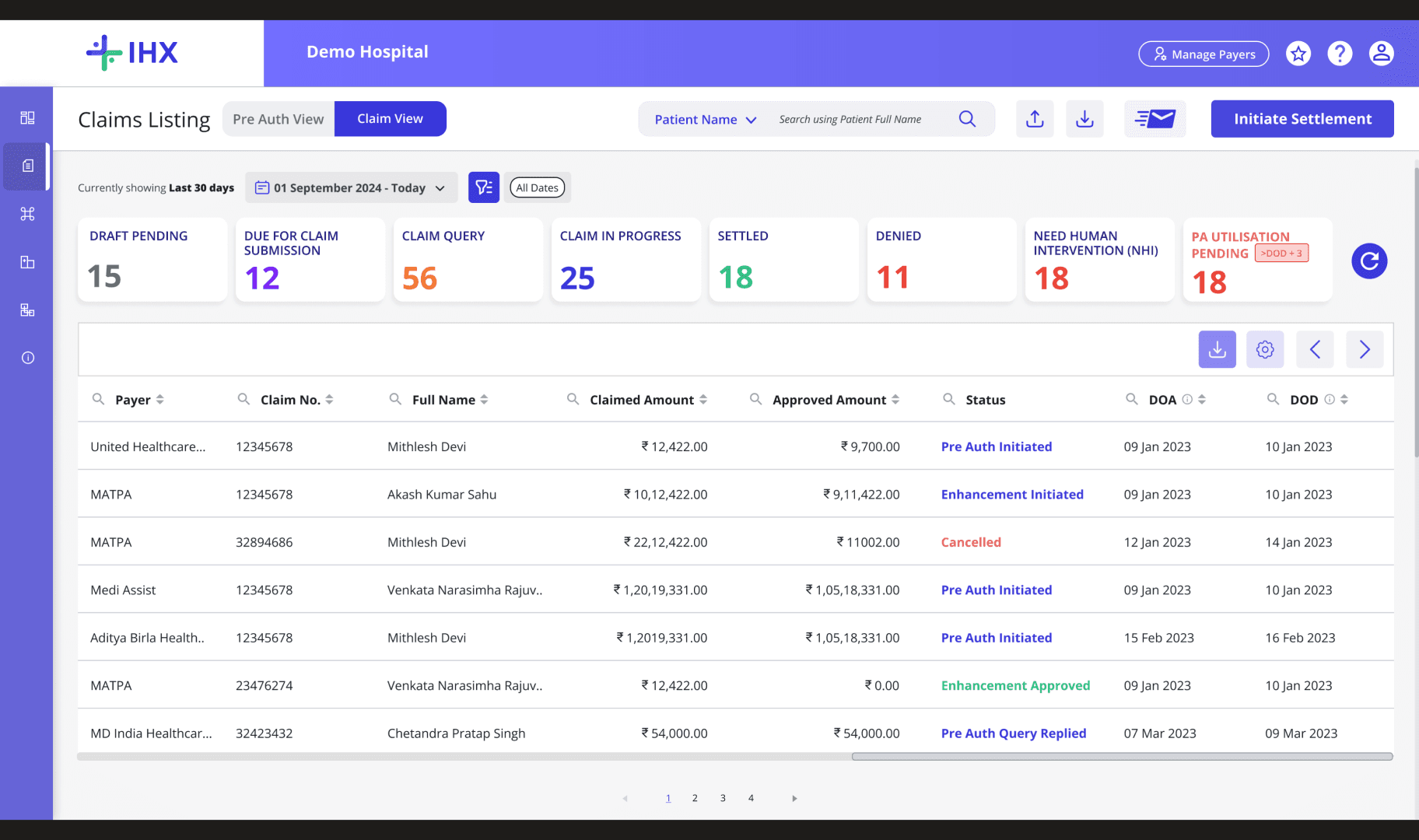
Visual design: nested bucket hierarchy with consistent visual cues across all modules
The bucket card — primary label, count, urgency indicator, secondary filter chips — communicates stage, volume, and action at a glance. Colour coding is consistent: indigo for approval states, amber for queries, teal for discharge, red for denied. Users learn the system once and it works everywhere. The same component was reused across PA View, Claim View, Government Scheme, Self-Funded Corporate, Recon Module, IHX Mobile App, and Reporting & Analytics — no additional design or dev work.
PA View
Claim View
Gov Scheme
Self-Funded Corporate
Recon Module
Reporting & Analytics
IHX Mobile App
VISUAL DESIGN — SCALABLE MODULAR DESIGN · HIERARCHY
03
Secondary filters evolved from single-select chips to checkbox multi-select
Initial design used horizontal tag chips — clean for single selections. Testing revealed supervisors needed to select multiple statuses simultaneously. Evolved to checkbox-based multi-select in a dropdown — serves both the staff member needing a focused filter and the supervisor needing a cross-status overview.
Testing-Driven Change
01
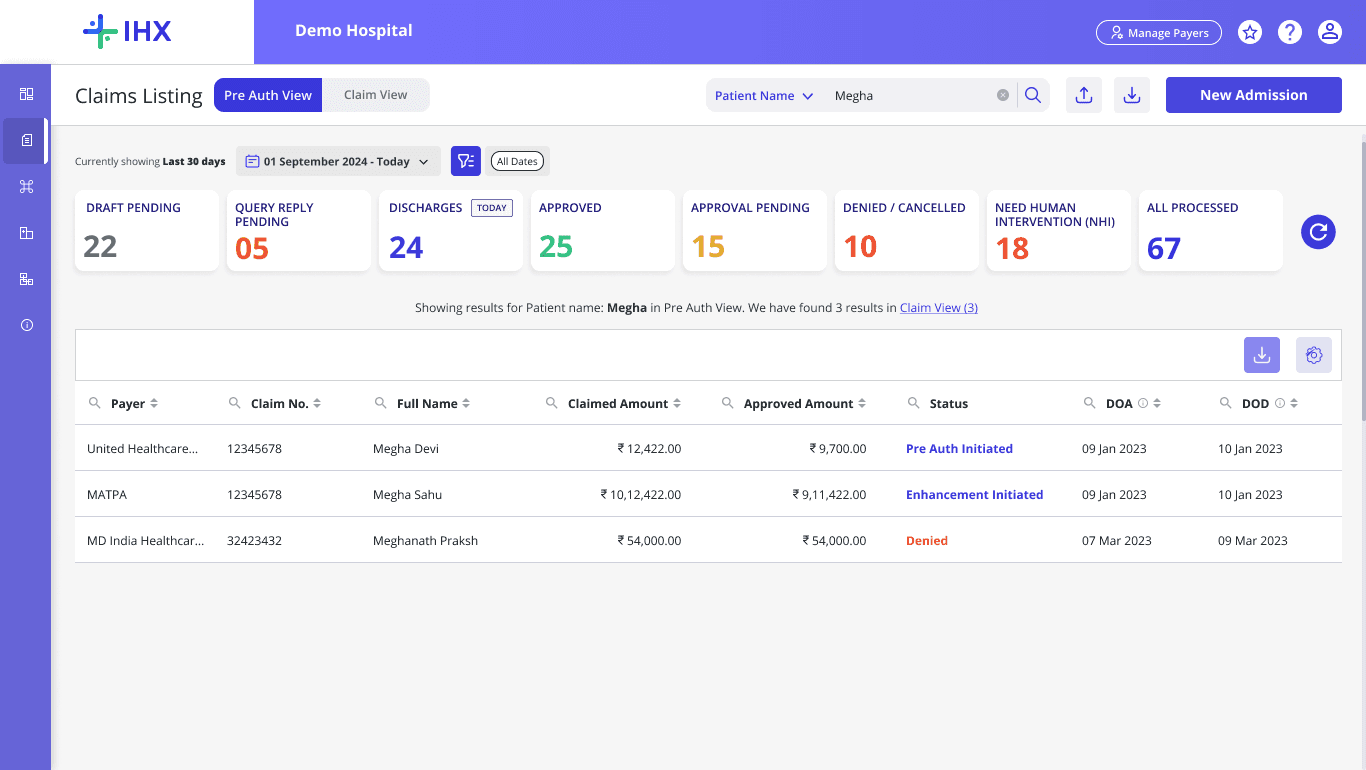
Handling search errors cross - view search results
Splitting views created a problem. A Claim Number search in Claim View will return empty results because the claim lived in Pre-Auth View. Users will the claim was missing. Fix: when a search returns no results, the platform shows how many results exist in the other view with a direct link to switch. One line of copy. Now one of the most-used interaction patterns post-launch.
Core Design Decision
05
The Follow-up feature - increasing platform stickiness
One of the points users were leaving the platform was to follow up with payers on delay in approval pending cases, . A feature was introduced email follow up through CTA under actions column inside the claim listing screen against cases along with the elapsed time.
Platform Stickiness Feature
06
Filtering by Time & Date
Searching claims by patient name returned everything—claims from origin onwards—forcing users to manually sift through noise. We added a time period and date filter with hierarchical claim date types, letting users surface only relevant records
Testing-Driven Change
08 — Testing: 4 Rounds & What Changed Each Time
Testing driven product design
Testing was not just validation. It was the process through which key decisions got made or remade. 2–3 hospitals per round, covering Pre-Auth staff, Claims staff, and supervisors.
ROUND 01
Validated the PA / Claim split
Both user groups navigated to their respective views without guidance. The split was validated.
User Feedbacks
Recommended the buckets relevant for each user groups
Discharge Tomorrow bucket flagged as irrelevant for Pre-Auth team — removed
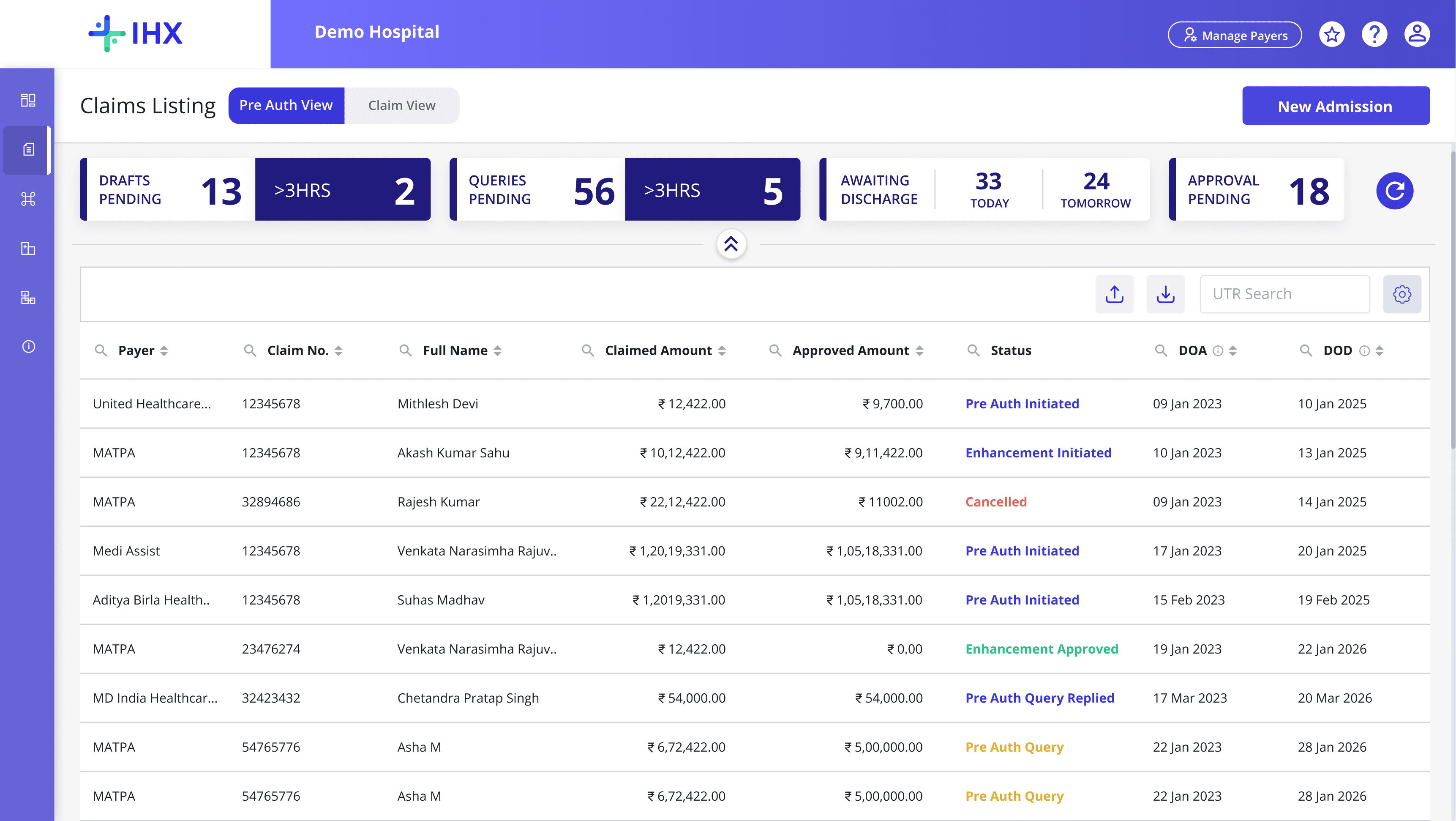
Screen split according to the user group
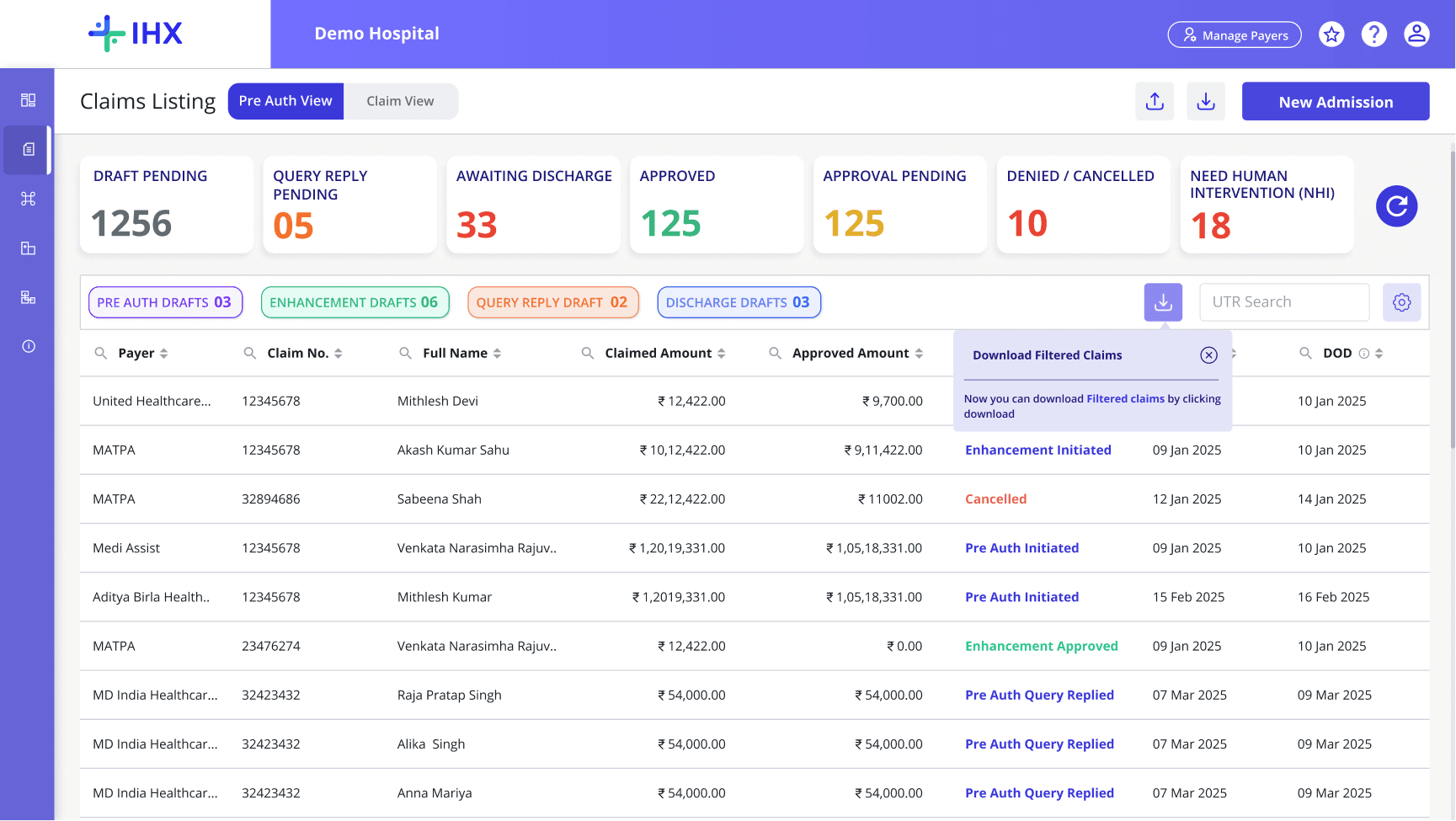
Action focused primary buckets based on stage
Status wise categorisation through secondary filters
Download filtered data
ROUND 02
Bucket hierarchy confirmed — label refinement needed
The nested bucket structure was understood. Bucket names needed adjustment to match how hospital staff refer to stages.
User Feedbacks
Bucket names adjusted to hospital vocabulary
Date filter requested for time period sorting
Supervisors flagged need to view multiple statuses simultaneously — informed multi-select filter decision
ROUND 03
Bucket names locked — multi-select filter and date filter added
Bucket names finalised from inputs across 5 hospitals and account managers. Checkbox-based multi-select built for secondary filters. Date filter introduced for time period scoping.
User Feedbacks
Global search consistently requested — flagged engineering constraint; scoped search decision initiated
Date-based filtering confirmed with as needed for both PA View and Claim View
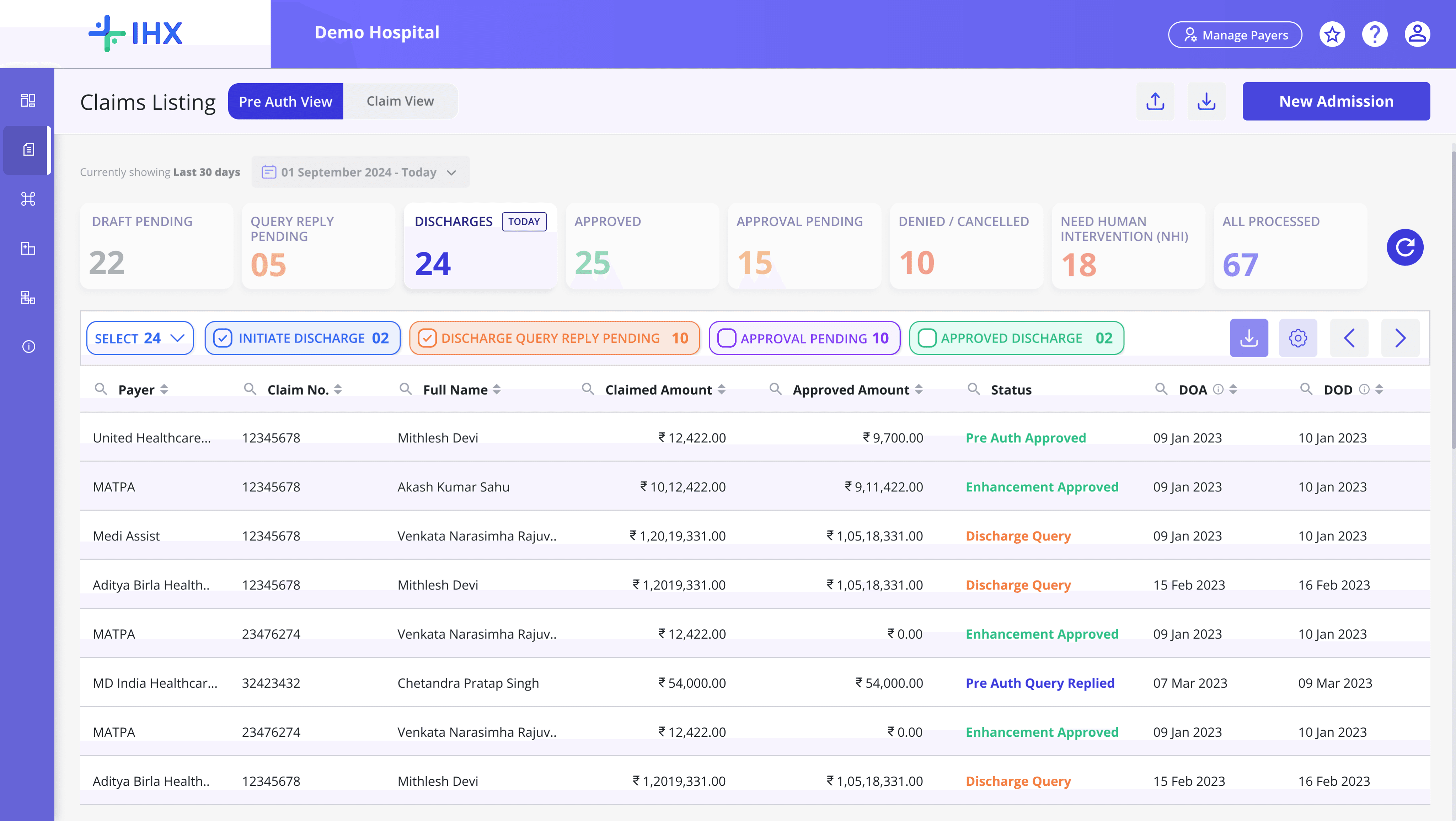
Multi-select checkbox
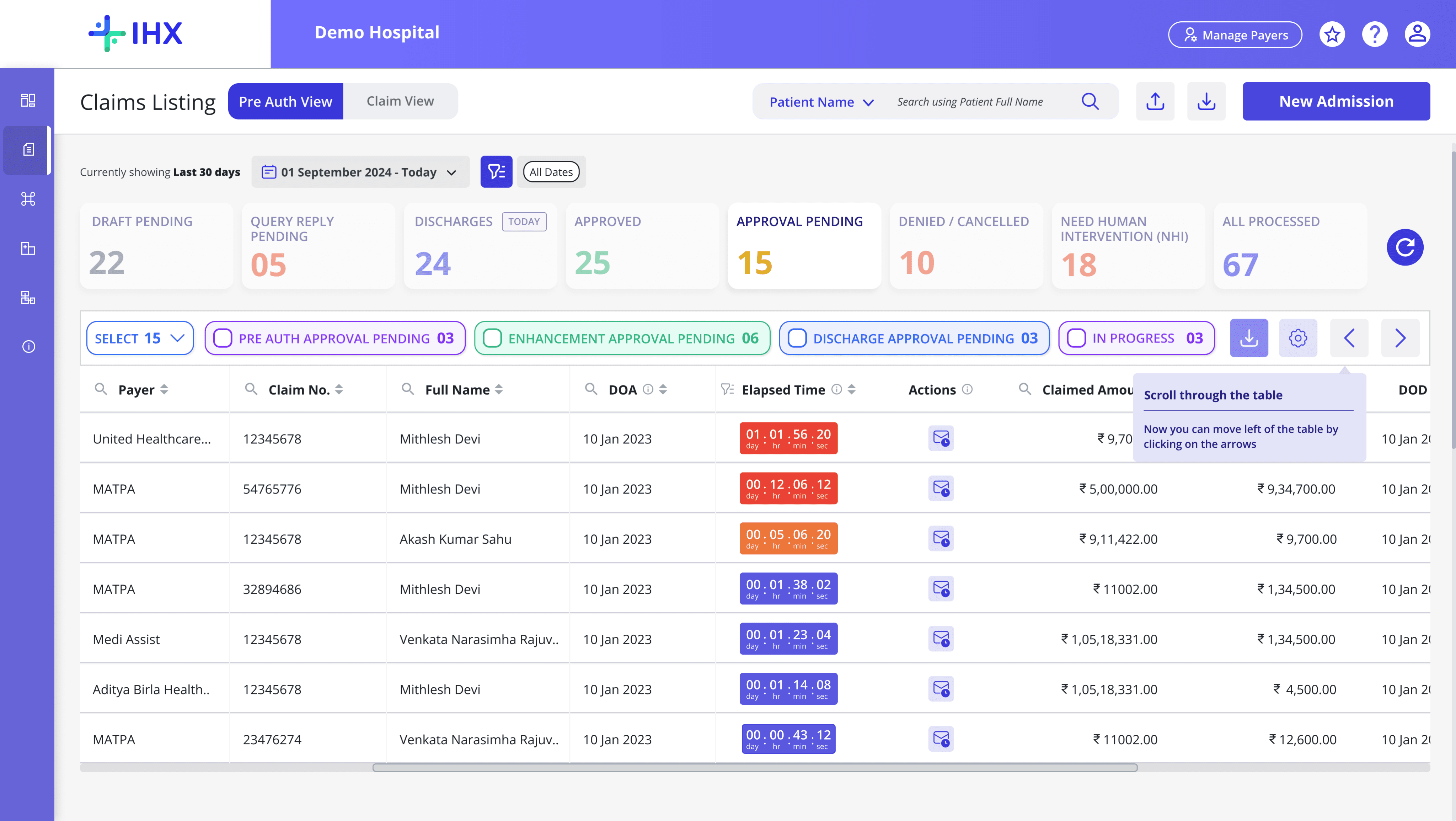
Scoped search
Elapsed time
Follow up feature
ROUND 04
Scoped search and follow-up feature validated
Scoped partial-match search across Patient Name, Claim Number, and UTR Number was tested and accepted. We introduced the follow-up feature directly within the Approval Pending bucket to keep users in the platform and reduce this drop-off.
Final Decisions
Scoped search accepted — staff confirmed partial name match covers their common cases
follow-up feature validated and confirmed to address the gap
Per-payer elapsed time configuration confirmed as necessary — a fixed default would not work across different insurer SLAs
09 — Constraints, Tradeoffs & Stakeholder Management
What I worked around, held on, and let go.
Four situations from this project where the decision was not straightforward.
01
ENGINEERING CONSTRAINT
Search — global search was infeasible. I used GA data to figure out what to build instead.
SHIPPED
SITUATION
Hospitals had been requesting global search since the platform launched. Engineering assessed ElasticSearch as infeasible — too expensive and architecturally complex at this database scale. The constraint was real and non-negotiable.
HOW I APPROACHED IT
I pulled Google Analytics event data on column-level searches. Patient Name: 68% · Claim Number: 20% · UTR Number: 12%. Over 80% of searches fell into three parameters. Rather than accepting a blank space, I built scoped search across those three — data-backed, constraint-aware, and faster in practice for the most common use cases. The search works as partial match — typing "yash" surfaces all patients with that string in their name.
RESULT
Scoped partial-match search across Patient Name, Claim Number, and UTR Number. Zero additional infra cost. Covers the real use cases.
02
STAKEHOLDER MANAGEMENT
One enterprise hospital pushed to remove the Discharge bucket entirely. I held the line. They signed anyway.
CLIENT RETAINED
SITUATION
During testing, one enterprise hospital pushed hard to remove the Discharge bucket and replace it with a secondary filter. Their workflow had specific reasons for this preference. The account manager was under pressure to accommodate them.
HOW I APPROACHED IT
The platform serves thousands of hospitals on a single interface. Accepting one hospital's structural preference would create inconsistency for every other hospital and a long-term maintenance problem. Four other hospitals in the cohort, plus broader AM input across the network, confirmed the Discharge bucket structure was right for the majority.
RESULT
I held the line, communicated the reasoning through the AM, and documented the feedback. Platform IA integrity maintained. Feedback on the roadmap.
03
MVP SCOPE
Settlement in bulk was painful. We designed it. We did not ship it.
DELIBERATELY DEFERRED
SITUATION
During testing, one enterprise hospital pushed hard to remove the Discharge bucket and replace it with a secondary filter. Their workflow had specific reasons for this preference. The account manager was under pressure to accommodate them.
HOW I APPROACHED IT
The platform serves thousands of hospitals on a single interface. Accepting one hospital's structural preference would create inconsistency for every other hospital and a long-term maintenance problem. Four other hospitals in the cohort, plus broader AM input across the network, confirmed the Discharge bucket structure was right for the majority.
RESULT
I held the line, communicated the reasoning through the AM, and documented the feedback. Platform IA integrity maintained. Feedback on the roadmap.
03
DESIGN THINKING — PLATFORM STICKINESS
The Follow-Up Feature — from workflow improvement to contract requirement.
CONTRACT SECURED
SITUATION
Hospital staff were leaving IHX to send follow-up emails from their inbox when claims sat in Approval Pending with no insurer response. Every exit broke the workflow.
HOW I APPROACHED IT
The feature itself was straightforward. The real design work was the configuration layer. A fixed system default would have been wrong for most hospitals — different insurers operate on different timelines, each hospital has its own MOU with each payer. The elapsed time is configurable per payer in Manage Configuration.
RESULT
Staff send follow-up emails directly from IHX without leaving the platform. Configurable per payer. This feature was a dealbreaker for several enterprise hospitals during contract negotiations. Not a nice-to-have. A requirement to sign.
THROUGH-LINE
Three things that ran through every decision here
Use data to answer design questions, not just validate them.
Search decision came from GA. Stakeholder pushback was settled by cohort testing. If I can get data, I get data first.
Platform decisions have to hold for everyone, not just the loudest user.
One hospital's workflow preference can't drive structural changes to a platform used by thousands.
Deferring is a decision, not a failure. It needs a reason and a record.
Bulk Settlement was ready. It was deliberately deprioritised and added to the v2
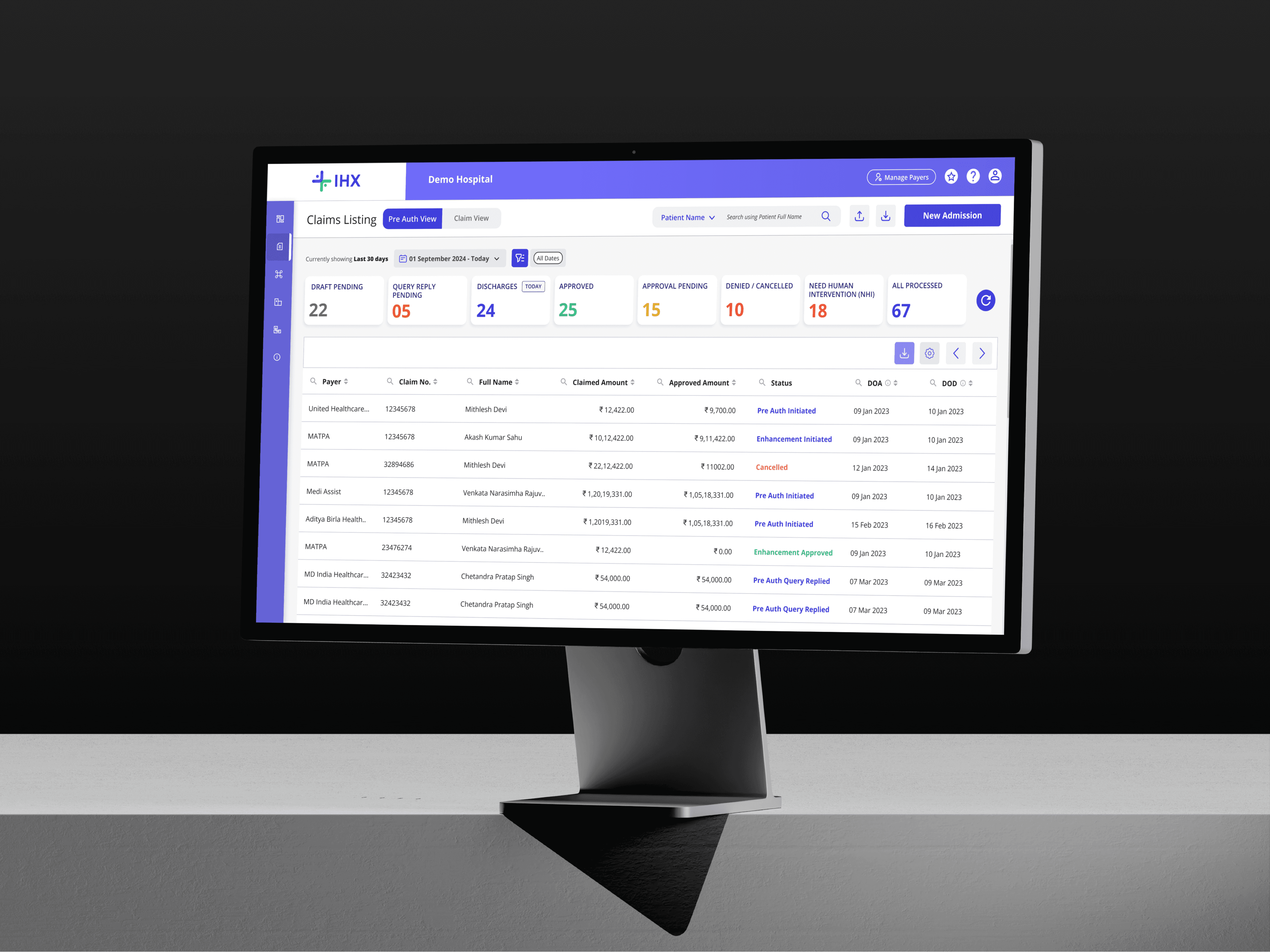
10 — Impact: Design Decisions Tied to Business Outcomes
The numbers matter. So does understanding which decisions produced which outcomes.
Four situations from this project where the decision was not straightforward.
REVENUE PER CLAIM
↑67%
New and existing clients opting for new Ops Dashboard
ENTERPRISE CONTRACTS
3
Group hospital contracts secured — follow-up feature was the dealbreaker
CSAT SCORE
4.6
Improved customer satisfaction post-launch
Increased Revenue / claim
67%
Increase in revenue per claim
Before
After
Reduced Average Time on Task
3.23 min

1.56 min
51 %
Reduction in
Avg Time on Task
Before
After
Increased Average task efficiency
34 %
Increased
Task Efficiency
Before
After
4000+
Clicks in 30 days across 10 pilot hospitals
51%
Reduction in avg time on task — 3.23 min to 1.56 min
34%
Increase in task efficiency
11 — What Do I Do Differently?
Learnings
Understand the full user journey. Do not assume.
Diving deep into the journey to capture all frustrations and requirements before designing. The brief was wrong. The Hotjar data told a different story.
Design with purpose. Evolve with feedback.
Test, listen, and iterate. Prioritise usability — aesthetics come second to function. The multi-select filter was a testing discovery, not an assumption.
Data-driven decisions.
Make design choices based on data, user feedback, and business goals — not just intuition. The scoped search solution came directly from GA event data.